Pdf Translation Format Comparison For Reports: Choose the Right Output
Published Sat Oct 03 2026 | 10 min read
Use this pdf translation format comparison for reports to choose editable DOCX, layout-preserved PDF, or bilingual review files—and catch QA gaps before release
A pdf translation format comparison for reports helps you choose an output based on what happens after translation: use a translated PDF when readers need a stable, shareable report, an editable DOCX when reviewers must revise text, and a bilingual file when teams need to check meaning against the source. For scanned reports, OCR comes first; whichever format you choose, verify tables, figures, page references, and translated text before release.
What a report translation format comparison actually compares
The phrase describes a decision across three connected formats: the source file being translated, the working or review file used during production, and the delivery file readers receive. They do not have to be the same. A report might arrive as a scanned PDF, be translated and edited in DOCX, reviewed in a bilingual table, and delivered as a final PDF.
PDF is designed to represent documents consistently across software and devices, but its fixed-page design does not make every PDF equally easy to edit. A file with selectable text differs from a scan that stores page images; a complex report with charts and columns poses different layout challenges from a simple text document. The Library of Congress describes PDF as a page-oriented format intended to preserve document presentation, while noting that PDFs can contain different kinds of content and structures (Library of Congress: PDF format description).
So the practical comparison is not “Which extension is best?” It is which format best supports the next task without hiding a quality risk. Choose by considering:
- Editing: Must a subject-matter expert revise the translated wording?
- Visual fidelity: Must the delivered pages resemble the source closely?
- Review: Does a reviewer need to compare source and translation line by line?
- Accessibility and reuse: Will readers search, copy, or reuse content in another system?
These priorities can conflict. A fixed-layout PDF may be convenient to circulate but awkward to correct. An editable DOCX can make revisions straightforward, yet its page breaks and table widths may shift when opened in different software. Decide which constraint matters most before translation starts.
Why the choice matters for report readers and reviewers
A report is more than paragraphs. Its meaning may depend on a table heading, a footnote, a chart legend, a numbered finding, or a reference to a particular page. Format choice affects whether those relationships stay visible and reviewable, not just whether the words have been translated.
For instance, a finance team may need a localized report that can be circulated unchanged after sign-off. Legal counsel may need to amend translated clauses and preserve a trail of revisions. Researchers may need to verify terminology against the source text, while a public-sector team may need both a reader-friendly PDF and an accessible text structure. Those jobs point to different outputs.
Use the following as a starting policy, not a universal rule:
- Final circulation: Deliver a translated PDF when page-level presentation and easy sharing are priorities; retain an editable source for later changes.
- Editorial or legal revision: Work in DOCX or another editable format, then create and check the final PDF after revisions.
- High-stakes verification: Give reviewers a bilingual view or aligned source-and-translation files, plus the intended final output.
- Data reuse: Keep tables in a structured editable file when analysts need to extract or update values; do not rely on a page image as the only record.
Language expansion is a common source of layout changes: a translated heading or sentence may take more space than its source. A design that fits tightly in one language can push text into a neighboring cell, split a paragraph across pages, or crowd a chart. “Looks similar” is not the same as “still communicates correctly.” Check both content relationships and visual presentation.
How the formats work through a translation workflow
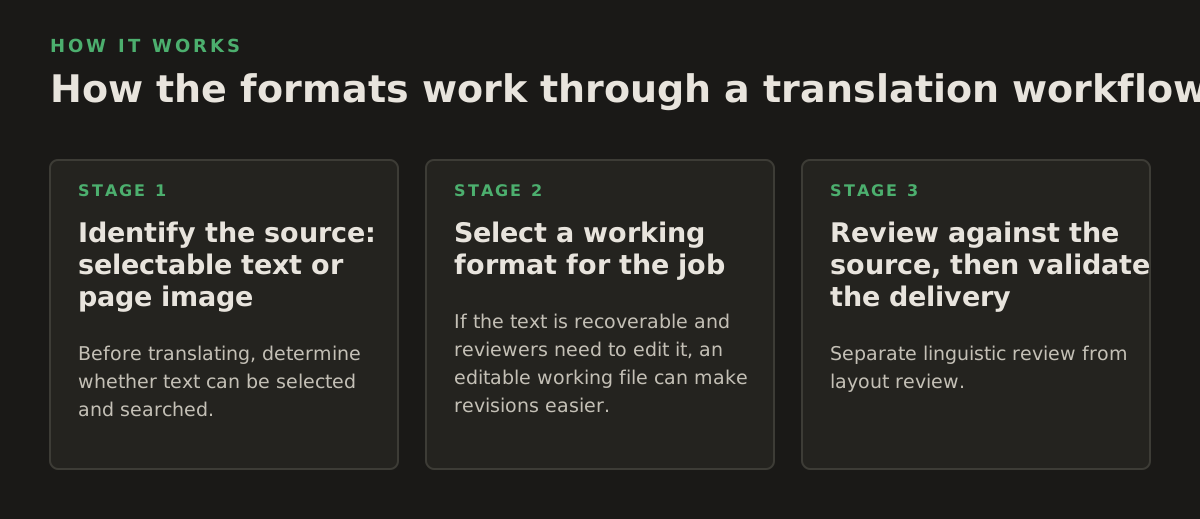
Good format decisions follow the document through extraction, translation, review, and delivery. Treat each handoff as a chance to catch a different class of error rather than expecting one file to serve every purpose.
1. Identify the source: selectable text or page image
Before translating, determine whether text can be selected and searched. If it cannot, the PDF may be image-based or may contain pages with no usable text layer. OCR (optical character recognition) turns image content into machine-readable text, but recognition is not the same as verification. Adobe explains that OCR can make scanned PDF text selectable and searchable; Google Cloud’s OCR documentation likewise describes extracting text from images and documents (Adobe: Scan documents to PDF; Google Cloud Vision: OCR).
For a scan, inspect the extracted text before translation. Look for misread digits, minus signs, decimal separators, headers, and footnotes; these can alter a report’s findings. If the scan is skewed, faint, or stamped over, correct or flag the source rather than silently guessing. Teams handling image-based files can review options to translate scanned PDFs.
2. Select a working format for the job
If the text is recoverable and reviewers need to edit it, an editable working file can make revisions easier. But conversion from PDF to an editable format may change line breaks, columns, spacing, or table structure. Adobe’s documentation on exporting PDFs describes conversion to other file formats; that conversion should be treated as a transformation to inspect, not as proof that the original layout has been perfectly reconstructed (Adobe: Export PDF files to other formats).
For a report that must remain page-oriented, translating from the PDF and delivering a PDF can avoid an unnecessary editable-file handoff. Still, check the output page by page. Layout retention is a production goal, not a guarantee that every font, chart, or table will match exactly.
3. Review against the source, then validate the delivery
Separate linguistic review from layout review. A bilingual reviewer checks whether the translation preserves the source’s meaning; a layout reviewer checks whether the intended content is present and legible in the final file. In a bilingual review file, make sure each source segment is aligned with the corresponding translation. In a final PDF, check the rendered pages rather than assuming the text layer tells the whole story.
- Illustrative example: A 12-page quarterly report arrives as selectable text. The team translates in an editable file, reviews numbers and terminology, then checks all 12 pages in the final PDF.
- Illustrative example: A 40-page field report contains scanned appendices. The team OCRs those pages, flags uncertain values, translates the verified text, and separately checks the appendices against their page images.
- Illustrative example: A 6-page legal memorandum needs counsel edits. The team keeps an editable working copy for revision and generates a fixed PDF only after the approved wording is final.
The page counts above are examples of workflow choices, not benchmarks. The important distinction is whether the chosen file allows the people responsible for review to detect the errors relevant to their work.
Where each format breaks—and what to check
No output format removes the need for quality control. Each one makes certain tasks easier while leaving specific failure modes.
| Format | Best fit | Typical risk | Review check |
|---|---|---|---|
| Translated PDF | Stable sharing and page-based reading | Text may be hard to edit; layout can still shift | Inspect every page, including footnotes, tables, and figures |
| Editable DOCX | Revisions, tracked changes, and reuse | Pagination, fonts, and tables may reflow | Compare the revised file with the approved source structure |
| Bilingual review file | Meaning checks and terminology review | Alignment can break or obscure page context | Confirm segment pairing and check source page references |
| OCR-derived text | Making scanned content available for translation | Recognition errors can alter words or values | Verify uncertain text against the scan before translating |
For tables, check that translated headers still describe the correct columns and that values remain in their original rows. For charts, verify legends, labels, and any text embedded in the image; translating the body text alone will not translate labels baked into a graphic. For references, check that page numbers and cross-references still point to the right material after pagination changes.
Accessibility is another separate check. A PDF that looks correct may still lack useful structure or document-language information. W3C’s PDF techniques include guidance on setting a document’s primary language, which supports assistive technology in interpreting the content (W3C: PDF16, setting the default language). Do not assume that visual fidelity alone makes a translated report accessible.
- Text layer: Can readers search and select the translated text?
- Structure: Do headings, lists, and tables retain a sensible reading order?
- Page integrity: Are no labels clipped, cells overlapped, or lines omitted?
- Numerical integrity: Do amounts, dates, percentages, and signs match the source meaning?
- Document language: Is the primary language set appropriately for the translated file?
How teams apply the comparison to real report work
Start with the release requirement, then work backward. The examples below show how different teams can choose formats without treating one output as the answer for every report.
Business and research reports
A business team circulating monthly performance reports may prioritize consistent page presentation and searchable text. A translated PDF can work as the distribution copy, while an editable source remains the revision copy. Researchers preparing translated papers may need editable text for revisions and a bilingual review file to check technical terms, citations, and figure references. If tables will be reused for analysis, preserve them in a structured form instead of relying on a flattened page.
Legal, government, and healthcare documents
Legal teams should choose a working format that supports counsel’s actual revision and review process. Keep source and translated versions clearly identified, preserve clause and page references, and have a qualified reviewer check meaning-sensitive language. Government teams may need a distribution-ready PDF plus an accessible version; confirm the organization’s requirements rather than assuming the visual PDF is sufficient.
Healthcare teams face a related issue when reports contain measurements, abbreviations, or tabular results. Keep the source available for verification, flag unclear scans, and check that units and labels remain associated with the right values. A bilingual view can help reviewers compare phrasing, but it does not replace subject-matter review.
Publishers and educators
For course materials and report-like publications, an editable file can support updates and localization, while a final PDF can preserve a print-ready arrangement. If the PDF contains scanned pages, OCR may be needed before text can be translated, and image-embedded labels may require separate handling. When the translated document will be reused in future editions, retain the editable master and record which file is approved for release.
A practical handoff checklist is:
- Record the source format and whether OCR was needed.
- Name the working, review, and final files so reviewers do not mark up an obsolete version.
- Specify who checks terminology, numbers, and layout.
- Keep the source PDF and approved editable file with the final translated output.
- For scanned documents, note any uncertain or unreadable passages rather than silently filling them in.
Make the choice from the next required action
For most report projects, the defensible approach is to choose the delivery format from the reader’s needs and the working format from the reviewer’s needs. Use PDF for stable circulation, DOCX for editing, and a bilingual file for source comparison; add OCR when the source is image-based, then verify recognition and page layout independently.
Before approving a format, ask the report owner one practical question: What must the next person be able to do with this file? If the answer is read and circulate, deliver a checked PDF. If it is revise, retain an editable version. If it is verify, provide a comparison view alongside the release copy. InOtherWord.AI translates PDFs and other document types with attention to formatting and layout; see how it can help you translate PDF documents.
Authored with NotFair SEO
Related guides
Keep researching the right workflow
These pages help move from general document-translation research into the specific file format or workflow you need.
A practical workflow for translating scanned PDFs with OCR while preserving enough structure for real review, sharing, and downstream editing.
Explore pageHow to translate PPT and PPTX decks without breaking slide layouts, charts, and speaker-ready formatting.
Explore pageThe best AI PDF translator is not just about language quality. It also needs OCR, layout preservation, and reviewable output for real files.
Explore pageCommercial pages
Ready to translate the actual file?
Jump from the guide into the product page that fits your document type, then continue into pricing when you are ready.
Format page
Translate PDF Documents
Translate PDF files while preserving layout, tables, and page structure.
Explore pageFormat page
Translate Scanned PDFs
OCR and translate scanned PDFs without rebuilding the layout by hand.
Explore pageFormat page
Translate PowerPoint Presentations
Translate PPT and PPTX decks while preserving slide layouts, tables, and speaker-ready formatting.
Explore pageTranslate layout-heavy PDF reports, manuals, forms, and client-ready files while keeping tables, headings, and images readable.
Explore page