Pdf Translation Vendor Selection Criteria: A Practical Buyer’s Guide
Published Tue Nov 17 2026 | 12 min read
Use pdf translation vendor selection criteria to compare workflow types, security, layout quality, human review, pricing, and measurable acceptance tests.
The most useful pdf translation vendor selection criteria are fit for your document type, translation quality, layout fidelity, security controls, review options, total workflow burden, and measurable acceptance tests. Choose a self-serve tool for repeatable, lower-risk files; a managed workflow when review and coordination matter; or a qualified human translation provider when nuance, legal effect, or publication quality requires expert accountability. Use the guide below to shortlist providers against a representative sample before committing sensitive or high-impact documents.
A PDF can be text-based, scanned, or a mixture of both; it may also contain tables, footnotes, handwriting, stamps, or complex page design. These differences affect extraction, translation, review, and rework. Define the job first: a legal team may need clause numbering and review traceability, while a university may prioritize citations and equation placement. Then compare the service categories and test the parts of the workflow most likely to fail.
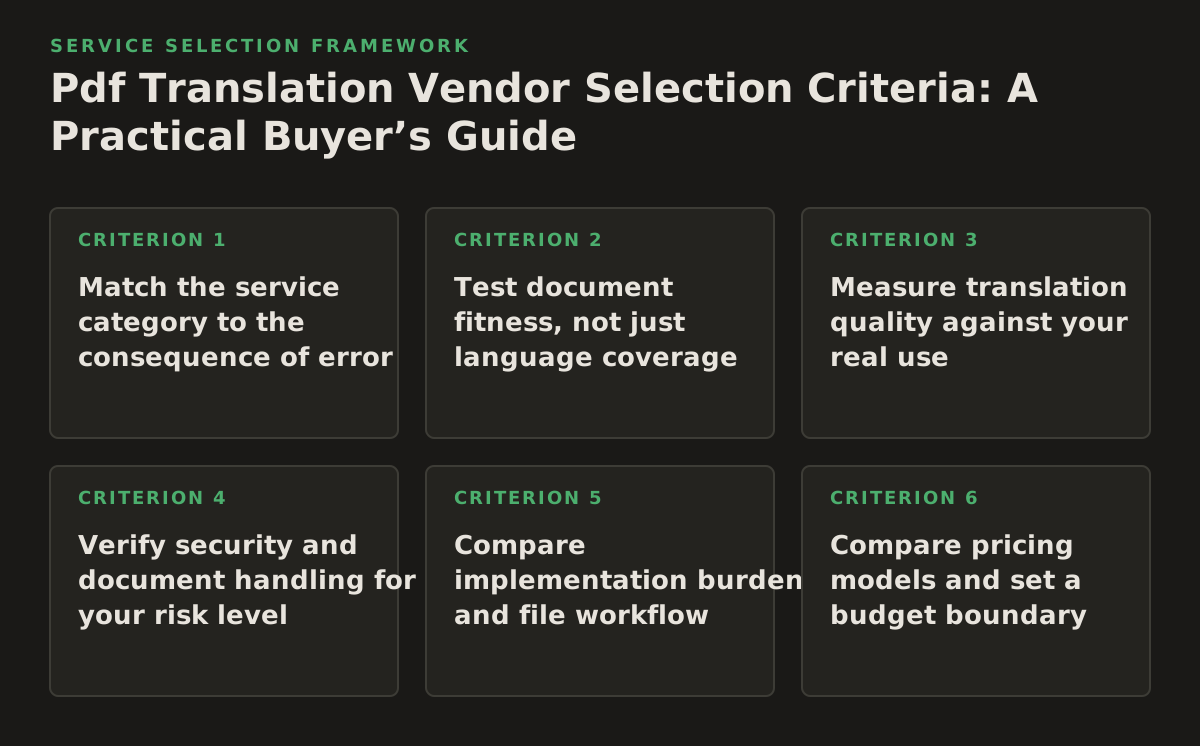
1. Match the service category to the consequence of error
Service labels can blur together. Ask who or what performs each step: text extraction, translation, terminology checks, layout repair, and final review. The right category depends on risk and document complexity, not on a vendor’s preferred product name.
| Buyer need | Service type to consider | Main trade-off | What to verify |
|---|---|---|---|
| Internal reading of a clean, text-based PDF | Self-serve machine translation | Fast setup and low coordination, but limited control over nuanced or consequential wording | Language coverage, file handling, output layout, and review options |
| Recurring documents with a repeatable process | Managed AI-assisted workflow | Can combine automation and review, but requires setup, ownership, and clear exception handling | Who reviews, how terminology is applied, and how corrections are tracked |
| Contracts, court materials, or other high-impact text | Human translation or human-led hybrid service | More coordination and review effort; accountability and subject expertise must be explicit | Relevant translator qualifications, review stages, and responsibility for final delivery |
| Scanned, heavily designed, or publication-ready PDFs | OCR plus translation and document engineering | More steps to manage; extraction and page reconstruction can introduce separate errors | OCR correction, layout repair, and acceptance of a rendered final file |
When a human step is non-negotiable
Use human review when a mistranslation could change an obligation, affect a patient or public-service decision, distort an academic claim, or damage a published work. For lower-risk internal reading, machine output may be an acceptable first pass if the reader understands its limitations. Translation-service requirements are addressed in ISO 17100; use the standard’s scope as a prompt for questions about provider processes, not as proof that a particular vendor is certified or suitable (ISO 17100:2015).
Make the handoff explicit
A failure mode is paying for a “managed” service without knowing whether a person checks the translation, the layout, both, or neither. For example, a publisher could request separate sign-off for terminology, proofreading, and final page composition. A legal team could require its own counsel to approve the translated text rather than treating a vendor’s linguistic review as legal approval.
2. Test document fitness, not just language coverage
A vendor’s list of supported file types does not tell you whether your actual PDFs will survive the workflow. Test representative files end to end, including the final export and the way reviewers will inspect it. A clean digital PDF and a scan with skewed pages are different processing cases.
Build a sample set that exposes risk
- Include one ordinary file and one difficult file: for example, a table-heavy report, a scanned form, or a document with footnotes and mixed languages.
- Identify must-preserve elements such as clause numbering, headers, citations, seals, page references, and table relationships.
- For scans, inspect whether text is searchable and whether OCR mistakes alter names, numbers, negations, or symbols. Adobe describes OCR as the process used to recognize text in scanned documents; test the recognized text rather than assuming a scan is clean (Adobe Acrobat: scanning and OCR).
- Ask the provider to return both the translated file and any review artifact your process needs, such as an editable version or a list of unresolved items.
Why this works: a short, representative test reveals whether your team will spend its time reviewing language or repairing files. A failure mode is choosing a polished sample with no tables, then discovering that dense tables reflow or become unreadable in production. For a university, include a page with equations and citations; for a government team, include a form with checkboxes and official labels.
When a scan is involved, ask who owns OCR correction and how uncertain text is flagged. If your team is comparing workflows for scanned documents, the relevant distinction is whether the process preserves usable text and page structure—not simply whether it accepts a scanned PDF. See what it means to translate scanned PDFs as part of that evaluation.
3. Measure translation quality against your real use
“Accurate” is not a useful acceptance criterion until the buyer defines what must be right. A translated contract can read smoothly yet mishandle a defined term; a research paper can preserve sentences but render a technical term inconsistently. Set quality checks by error consequence, and keep language review separate from layout review.
Write a test brief before requesting a sample
Give each shortlisted provider the same source file, target language, terminology list, audience, and instructions about whether the output is for comprehension, internal use, filing, or publication. Score the sample on a few observable dimensions:
- Meaning: Are obligations, qualifications, dates, names, units, and negations preserved?
- Terminology: Are repeated terms translated consistently and according to your approved glossary?
- Readability: Can the intended reader follow the text without ambiguity or awkward phrasing that obscures meaning?
- Reviewability: Can a bilingual reviewer locate and correct a problem without rebuilding the document?
Use reviewers who understand the subject matter and target language. A practical example: ask a researcher and a language reviewer to assess the same translated abstract, but have them score different things—technical meaning and linguistic clarity. A failure mode is letting one broad “looks good” rating hide an incorrect number or a term that changes meaning throughout the file.
If a provider uses AI in the workflow, ask how it identifies uncertain or exceptional content and how human corrections are applied. The NIST AI Risk Management Framework is a voluntary resource for organizing AI risk considerations; it can help structure questions about evaluation, monitoring, and accountability, but it does not certify a translation provider (NIST AI Risk Management Framework).
4. Verify security and document handling for your risk level
Contracts, patient-related materials, unpublished research, and government records can contain sensitive information. Do not infer safeguards from a provider’s general statement that it is secure. Ask for documented data-flow and retention answers that your security, privacy, or procurement team can assess.
Ask what happens from upload to deletion
- Where are files processed, and which service providers or subprocessors can access them?
- How long are source files, translated outputs, and logs retained? Can retention be configured or deletion requested?
- Are submitted documents used to train or improve models? What controls or contractual terms govern that use?
- How are user access, administrator access, and incident notifications handled?
- Can the provider document the controls relevant to your organization’s policies and applicable obligations?
The NIST security and privacy controls catalog offers a structured reference for discussing safeguards such as access control and auditability; use it to frame procurement questions rather than assuming a vendor meets a particular control (NIST SP 800-53 Rev. 5, Update 1). A failure mode is uploading confidential material to a trial account before the organization has approved the data flow. For a healthcare or legal team, first test with approved, non-sensitive sample material and route the vendor’s answers through the appropriate internal review.
Separate capability from compliance. A provider may describe encryption or access controls without establishing that its service is approved for your specific data, jurisdiction, or contract. If an answer is vague, request the relevant policy or agreement and have your own security or legal owner decide whether it is sufficient.
5. Compare implementation burden and file workflow
Translation is only one part of the work. Teams also prepare files, remove sensitive content where required, define terminology, review exceptions, distribute outputs, and archive approved versions. Estimate the work your team must still do before comparing service offers.
Cloud document-translation services illustrate why workflow details matter: Google Cloud documents distinct handling and constraints for document translation, including supported document formats and processing modes. Check the current documentation against your exact file and workflow rather than assuming that “PDF supported” means every PDF will behave identically (Google Cloud: translating documents). Microsoft’s documentation similarly describes its document translation workflow and supported inputs; verify the details directly if considering that type of service (Microsoft: document translation overview).
Map the work before selecting a provider
For each option, assign an owner and estimate the effort required to:
- Prepare and upload files, including scanning or splitting oversized documents.
- Provide language direction, terminology, and formatting instructions.
- Review translation and correct OCR or layout issues.
- Approve, deliver, and retain the final files in the organization’s workflow.
A failure mode is treating an export that needs extensive manual layout repair as a low-effort solution because the translation itself was automated. For example, a publisher should ask whether the provider returns a finished, reviewable PDF or only translated text that an editor must place back into the design. If your files are standard PDFs, compare the steps needed to translate PDF documents with the steps required by other workflow options.
6. Compare pricing models and set a budget boundary
Do not compare totals until you know what each quote includes. Providers may structure charges around document volume, pages, words, seats, usage, project management, human review, or a combination. Ask for the charging unit and scope in writing; there is no meaningful price comparison if one quote includes proofreading and another does not.
Questions that expose the real cost
- What triggers a charge: upload, page, word, usage, user, minimum project, or review stage?
- Are OCR correction, terminology preparation, layout repair, rush handling, and revisions included or separate?
- What happens to the cost when a file is scanned, has complex tables, or needs a second target language?
- Can we run a limited pilot, and what work or commitment does it require?
- What are the renewal, cancellation, storage, and support terms?
Build a comparison using your own expected volume and rework assumptions. An illustrative budget model—not a market price benchmark—is to calculate the quoted service cost plus internal preparation, reviewer time, layout repair, and repeat processing. A failure mode is choosing the lowest visible fee while leaving substantial review labor uncounted. For a research office, include faculty or subject-reviewer time; for a legal team, account for counsel’s approval time as a separate requirement, not a vendor promise.
7. Use a scorecard and interview checklist to make the decision
A shortlist becomes easier to defend when every provider answers the same questions and demonstrates the same sample workflow. Set weights before scoring so a compelling presentation does not quietly override a critical requirement. Use pass/fail gates for hard constraints such as approved data handling, then compare the viable options on quality and operational fit.
Illustrative scorecard
As a starting policy—not a universal weighting—score each category from 1 to 5 and weight it to reflect your organization’s priorities. Record evidence beside each score; “vendor says yes” is weaker than a demonstrated sample or a written policy.
| Category | Evidence to record | Suggested decision test |
|---|---|---|
| Language and subject fit | Sample review, terminology handling, reviewer qualifications | Can reviewers identify and resolve material errors? |
| PDF and scan handling | Representative-file output and exception notes | Are critical text, tables, and page elements usable? |
| Security and governance | Data-flow answers, retention terms, relevant documentation | Does the option pass internal approval? |
| Operational effort | Steps, owners, manual corrections, delivery format | Can the team sustain the workflow at expected volume? |
| Commercial fit | Charging unit, included work, renewal and exit terms | Can the cost be forecast from expected usage? |
Vendor interview checklist
- Show us how this representative PDF moves from upload to approved final output.
- Which file conditions trigger OCR, manual intervention, or a failed job?
- Who reviews language and layout, and what does each review include?
- How do we supply terminology and correct a recurring translation error?
- What is retained, who can access it, and how is deletion handled?
- Which charges apply to the test, normal usage, revisions, and exit?
A red flag is an answer that changes when you ask who owns a specific step, or a refusal to let you test a representative file under appropriate safeguards. Another is a quality claim with no defined review method or acceptance criteria. Make the provider explain exceptions: a successful ordinary PDF test does not establish fitness for scans, complex forms, or every language pair.
Implementation plan: shortlist, pilot, approve, then scale
Run selection as a controlled sequence so the first high-stakes production document is not also your first meaningful test.
- Classify the work. List document types, language pairs, sensitivity, intended use, and consequences of an error. Separate reading copies from files intended for official, legal, clinical, or publication use.
- Set non-negotiables. Define security approval, required human review, file-output expectations, and any terminology or traceability needs. Reject options that fail a hard requirement before comparing convenience.
- Choose a representative pilot. Use a file that exposes the real challenges, but only after approving how its content will be handled. Give every shortlisted provider the same instructions and success measures.
- Score the output and workload. Have the relevant language and subject reviewers assess meaning, terminology, and readability. Separately record OCR corrections, layout repairs, turnaround dependencies, and internal labor.
- Resolve commercial and governance questions. Confirm included work, charging units, retention terms, revision handling, and the process for ending or changing the service.
- Approve a bounded rollout. Start with a defined document class and named owners. Track error categories, reviewer effort, rework, and missed requirements; expand only when results meet your criteria.
For file-based translation workflows, InOtherWord.AI describes a platform for PDFs and scanned PDFs, among other document formats. Review its InOtherWord.AI alongside other shortlisted services, and validate any candidate against your own sample, security review, and acceptance criteria.
Authored with NotFair SEO
Related guides
Keep researching the right workflow
These pages help move from general document-translation research into the specific file format or workflow you need.
A practical workflow for translating scanned PDFs with OCR while preserving enough structure for real review, sharing, and downstream editing.
Explore pageHow to translate PPT and PPTX decks without breaking slide layouts, charts, and speaker-ready formatting.
Explore pageThe best AI PDF translator is not just about language quality. It also needs OCR, layout preservation, and reviewable output for real files.
Explore pageCommercial pages
Ready to translate the actual file?
Jump from the guide into the product page that fits your document type, then continue into pricing when you are ready.
Format page
Translate PDF Documents
Translate PDF files while preserving layout, tables, and page structure.
Explore pageFormat page
Translate Scanned PDFs
OCR and translate scanned PDFs without rebuilding the layout by hand.
Explore pageFormat page
Translate PowerPoint Presentations
Translate PPT and PPTX decks while preserving slide layouts, tables, and speaker-ready formatting.
Explore pageTranslate layout-heavy PDF reports, manuals, forms, and client-ready files while keeping tables, headings, and images readable.
Explore page