Translation Management System: What It Does and How to Use One
Published Sun Sep 27 2026 | 9 min read
A translation management system coordinates files, translators, terminology, review, and delivery. Learn what it solves and where document workflows still need
A translation management system coordinates the people, content, rules, and review steps involved in translating material across languages. It is not simply a machine translator: it helps teams route work, reuse approved translations, manage terminology, track versions, and deliver reviewed files. For legal, research, business, publishing, government, and healthcare teams, the practical question is whether it can manage the workflow and the actual document formats they depend on.
What a Translation Management System coordinates
A TMS is a workflow layer for translation work. Depending on the system and how it is configured, it may connect a source file to a project, divide content into manageable units, assign work, provide reference material, collect review decisions, and return translated content for delivery. The goal is controlled movement from source to approved target, not merely conversion from one language to another.
Common components include:
- Project and task tracking: records languages, deadlines, owners, status, and review stages.
- Translation memory: stores previously approved source-and-target segments for possible reuse.
- Terminology management: gives translators preferred terms, definitions, and prohibited alternatives.
- Machine translation connections: may provide draft translations that people can review and edit.
- Quality checks and delivery: flags configured issues and packages approved content for its destination.
These parts are not interchangeable. A translation memory is a reusable language asset, while a terminology list governs particular words and a workflow tracks who must act next. A system can have all three and still fail a document team if it cannot preserve the structure of its files or support the required review controls.
Interoperability matters when content moves between tools. The OASIS XLIFF 2.1 specification defines a format for exchanging localizable content and associated information, including segmentation and workflow-related metadata. That standard helps explain why a TMS may transform or exchange content behind the scenes rather than translate a whole file as one undifferentiated block.
Why it matters to document-heavy teams
Without a managed workflow, teams often pass files through email or shared folders, track decisions in separate spreadsheets, and rely on individuals to remember the latest terminology. That creates operational risk: a reviewer may edit an outdated version, a defined legal term may be translated inconsistently, or a confidential document may go to an unapproved service. A TMS can make ownership and status visible, but only if the workflow rules match the work.
For a legal team, the key benefit may be traceable review: who translated a clause, who approved it, and which source version was used. For a research office, it may be a consistent vocabulary for study methods and measured outcomes. A publisher may care more about chapter-level reuse and editorial review, while a healthcare team may need carefully controlled handling of patient-facing instructions.
The value is usually greatest when content recurs, involves several roles or languages, or must pass a defined approval process. It may be less useful to build a complex TMS workflow for a single, one-off document if the setup and handoffs outweigh the coordination benefit. Before adopting one, identify the actual failure the system should prevent:
- Repeatedly translating approved content from scratch.
- Sending work to the wrong reviewer or language specialist.
- Using inconsistent names, product terms, or defined legal terms.
- Losing comments, tables, footnotes, or layout during file conversion.
- Being unable to tell which translated version is approved for use.
That list also separates workflow problems from document problems. A TMS may improve routing and reuse without being the right tool to repair a scanned page, preserve a complicated slide layout, or verify that a translated table still communicates the right result. Teams should assess these needs separately.
How the main mechanisms work
Translation memory and terminology
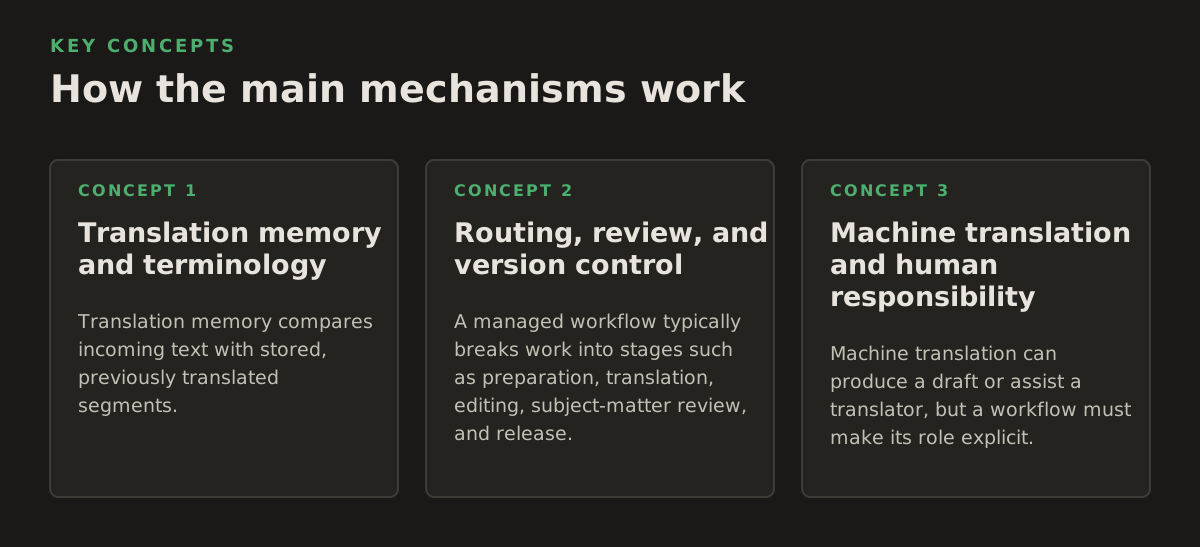
Translation memory compares incoming text with stored, previously translated segments. An exact or partial match can give a translator a starting point; it is not automatically proof that the old translation fits the new context. A clause may have changed meaning, a figure may have been updated, or a once-correct phrase may no longer follow current policy. Treat matches as suggestions requiring contextual judgment, especially in contracts, clinical content, and academic claims.
Terminology management addresses a different problem: choosing the approved word or phrase. A useful entry may include the term, its definition, the languages involved, a preferred translation, a disallowed alternative, and a subject-area note. Google Cloud’s glossary documentation describes how a glossary can guide translation of specified terms. In a team workflow, the operational lesson is to maintain terms as governed assets: identify an owner, record the reason for a change, and tell translators which content the rule applies to.
Routing, review, and version control
A managed workflow typically breaks work into stages such as preparation, translation, editing, subject-matter review, and release. Not every file needs every stage. A routine internal memo may need a translator and one reviewer; a court filing or patient instruction may need a subject expert and a documented final approval. Assign review according to the consequence of error, not simply because a workflow template offers another approval box.
Version control should link the translation to the exact source it represents. If the source changes after translation begins, the team needs a way to identify affected passages and decide whether they must be retranslated or reapproved. Exchange formats such as XLIFF can carry structured localization content between systems, but teams still need clear rules for what counts as a new source version and who resolves conflicting edits.
Machine translation and human responsibility
Machine translation can produce a draft or assist a translator, but a workflow must make its role explicit. A system that offers machine-generated text does not establish that the text is accurate, suitable for publication, or approved for a particular audience. Google’s document translation documentation describes a document-oriented translation workflow; teams should still verify what happens to their specific file, content, and formatting in the service they choose.
Set the policy before sending content for processing: which material may use machine translation, whether a qualified person must review it, and what uses are prohibited without approval. For legal, health, or government documents, human accountability must remain clear. A reviewer should be able to see what was machine-generated, what was edited, and who accepted the final wording where those distinctions are material to the organization.
Where translation workflows break
A TMS can organize translation content without solving every file-handling problem. Text in a DOCX paragraph is structurally different from text embedded in a chart, a scanned PDF, a slide master, or an image. Extraction may omit or reorder content; reflow may change page breaks; and a textually correct result may still contain clipped labels or broken tables. Language quality and layout fidelity are separate checks, so define acceptance criteria for both.
For ordinary digital documents, inspect tables, headers, footnotes, page numbers, and text boxes after translation. For scanned documents, optical character recognition must first identify the text, and recognition errors can flow into the translation unless someone checks the extracted source. If the source is a scan, the workflow may need a dedicated OCR and document-preparation step; teams can use a process designed to translate scanned PDFs rather than treating image-only pages like editable text.
Document translation tools may preserve some formatting while still requiring a final visual review. Microsoft’s Azure AI Translator document translation overview describes document translation as a distinct capability from translating plain text. That distinction is useful when evaluating a TMS: check whether it processes the file itself, hands content to another service, or expects a separate tool to rebuild the document.
Other failure points are procedural rather than technical:
- Unclear source ownership: two departments submit different “final” files.
- Unmaintained terminology: an old term remains in a glossary after policy changes.
- Overbroad reuse: a translation-memory match is accepted despite a changed context.
- Missing subject review: fluent wording obscures a factual or regulatory error.
- Unexamined data handling: sensitive text is routed to a service without the required internal approval.
Internationalization standards also distinguish content that should be translated from content that should be preserved. The W3C Internationalization Tag Set (ITS) 2.0 specifies mechanisms for associating localization-related information with content, including whether text is translatable. In practice, teams should mark items such as code, product identifiers, or legally fixed names deliberately rather than expecting translators to infer every exception.
How practitioners apply a TMS
Start with one repeatable workflow rather than attempting to centralize every department at once. Map the source file, language pair, people involved, review obligations, delivery format, and retention rules. Then test the workflow with representative files, including the least convenient one: a document with footnotes, a complex table, or scanned pages. The purpose is to expose handoff and formatting gaps before they affect routine work.
For example, the following are illustrative cases, not performance benchmarks:
- Legal: a 12-page contract is assigned to a translator, then a legal reviewer checks defined terms and clause numbering before release.
- Research: a 30-page paper uses an approved glossary for study names and measures; a subject editor checks terminology and tables.
- Business: a 6-slide internal presentation is translated, then the owner checks chart labels and text fit on each slide.
- Healthcare: a 2-page patient instruction sheet receives language review and clinical approval before distribution.
- Publishing: a 10-chapter course book is divided into manageable units, while the editor checks recurring terms and cross-references across chapters.
These examples show why “translation complete” is not a sufficient status. Define what completion means for each job: translated, reviewed, formatted, approved, or released. A simple status model prevents a draft from being mistaken for an authorized version.
When comparing systems or designing an internal workflow, ask for evidence against the files and controls you actually use:
- Can it accept the source formats your teams submit, including scans where relevant?
- How are tables, images, charts, comments, and tracked changes handled?
- Can reviewers see context and distinguish new text from reused translations?
- Can the team control terminology, approval stages, and source-version changes?
- What happens to files and content during processing, and does that fit internal policy?
- Can the final file be checked visually before it is approved for use?
For a PDF-centered workflow, distinguish the need to manage translation tasks from the need to preserve a document’s visible structure. A TMS may coordinate the work, while a document translation tool handles the file conversion and layout. Teams evaluating that part of the process can compare their requirements with a workflow to translate PDF documents.
Choose the workflow before choosing the system
Write down the minimum control your work requires: approved source versions, language-specific reviewers, terminology ownership, permitted machine-translation use, and final-file checks. Then test candidate workflows with a representative document and ask the people who will translate, review, and release it to identify what is missing. A small, explicit process that people follow is more useful than a feature-rich process with unclear ownership.
InOtherWord.AI translates PDFs, scanned PDFs, DOCX files, PowerPoint presentations, and EPUB books while preserving document formatting and structure. If your workflow centers on translating complete files as well as coordinating review, InOtherWord.AI may be a useful part of that process.
Authored with NotFair SEO
Related guides
Keep researching the right workflow
These pages help move from general document-translation research into the specific file format or workflow you need.
A practical workflow for translating scanned PDFs with OCR while preserving enough structure for real review, sharing, and downstream editing.
Explore pageHow to translate PPT and PPTX decks without breaking slide layouts, charts, and speaker-ready formatting.
Explore pageThe best AI PDF translator is not just about language quality. It also needs OCR, layout preservation, and reviewable output for real files.
Explore pageCommercial pages
Ready to translate the actual file?
Jump from the guide into the product page that fits your document type, then continue into pricing when you are ready.
Format page
Translate PDF Documents
Translate PDF files while preserving layout, tables, and page structure.
Explore pageFormat page
Translate Scanned PDFs
OCR and translate scanned PDFs without rebuilding the layout by hand.
Explore pageFormat page
Translate PowerPoint Presentations
Translate PPT and PPTX decks while preserving slide layouts, tables, and speaker-ready formatting.
Explore pageTranslate layout-heavy PDF reports, manuals, forms, and client-ready files while keeping tables, headings, and images readable.
Explore page