Document Translation For Uscis: Certification, OCR, and Filing Guide
Published Fri Sep 18 2026 | 11 min read
Document translation for USCIS explained: certification rules, OCR pitfalls, file workflows, and review steps for petitions, evidence, and forms.
Document translation for USCIS generally means submitting a complete English translation of every foreign-language document included with an immigration filing, together with a translator’s certification that the translation is accurate and that the translator is competent to translate. The translator does not normally need to be a court-certified translator or notarized; the important requirement is a properly signed certification and a translation that matches the source document. The governing regulation is 8 CFR § 103.2(b)(3), while USCIS explains the same rule in its Policy Manual guidance on translations.
That answer resolves the basic compliance question, but it does not resolve the operational one: how do you turn a birth certificate, court record, academic transcript, medical report, or scanned family document into an English exhibit that an officer can read and verify? The difficult work is usually completeness, names and dates, legibility, document structure, and review—not simply producing English sentences.
What the USCIS translation requirement actually covers
USCIS is not asking for an English summary of a foreign document. It expects a translation of the document submitted as evidence. If a page contains stamps, handwritten notes, marginal comments, seals, tables, or text on the reverse side, those elements may carry evidentiary meaning and should not silently disappear.
The two-part submission
A foreign-language exhibit normally has two connected parts:
- A complete English translation of the source document, including relevant non-body text such as headings, seals, annotations, and handwritten entries.
- A signed translator certification stating that the translator is competent to translate from the source language into English and that the translation is complete and accurate to the best of the translator’s knowledge.
The certification should identify the translator, the language pair, and the date. It should also provide contact information that allows a reviewer to identify the certifying person. A law firm or applicant should not attach a generic statement such as “translated accurately” without connecting it to the particular document or packet.
Certification is not the same as notarization. USCIS’s regulation specifies the translator’s competency and accuracy certification; it does not create a general requirement that every translation be notarized. A requesting agency, consulate, court, university, or opposing counsel may impose additional rules, so the filing instructions for the specific matter still control.
Translate the exhibit, not just the important sentence
Selective translation creates avoidable questions. For example, translating only the name and date on a marriage certificate leaves out the issuing authority, registration number, annotations, and any notation showing a later amendment. In a court record, translating only the judgment but not the caption, disposition, or filing stamp can make the exhibit difficult to authenticate.
USCIS form instructions can add context about supporting evidence. For example, the official Form N-400 instructions address supporting documents and translations in the naturalization filing process. Petition-specific instructions should be checked rather than assuming that a rule used for one form applies identically to every filing.
Why formatting and document integrity matter
Translation quality has two dimensions: linguistic accuracy and evidentiary usability. A grammatically excellent translation can still be weak if the reviewer cannot tell which translated line corresponds to a seal, whether a page is missing, or where a number came from.
Layout carries evidence
Document structure helps establish relationships between facts. A table may put a child’s name in one column and a date of birth in another. A court order may distinguish the judge’s ruling from a clerk’s stamp. A transcript may use separate columns for course code, title, credit hours, and grade. Flattening that structure into a paragraph increases the chance that a reviewer—or the legal team preparing a brief—will misread the evidence.
For PDFs, preserve page order and make the translated file easy to compare with the original. When practical, use matching page labels such as “Translation of page 1 of 3.” If a translation cannot reproduce a seal or handwritten mark visually, describe it clearly in brackets, for example: “[Round blue seal bearing the name of the issuing registry].” Do not invent content that cannot be read.
InOtherWord.AI is designed for document workflows where layout, tables, and images need to remain usable. Teams working with ordinary digital files can use translate PDF documents when the source is a PDF; a scanned source requires an OCR-aware workflow such as translate scanned PDFs. Those tools can reduce formatting labor, but they do not replace a person’s responsibility to verify the final exhibit.
Names, dates, and numbers deserve special treatment
Errors in proper nouns are more damaging than awkward phrasing. A translated birth certificate that changes a surname, reverses a date, or drops a middle name may appear to conflict with a passport or petition even when the underlying records are consistent.
- Names: compare the translation against the passport, petition, and other identity documents; preserve diacritics when relevant and explain meaningful variations.
- Dates: identify the date format when ambiguity is possible, especially for day-month-year records; do not silently convert an uncertain date.
- Numbers: verify registration numbers, case numbers, addresses, grades, monetary amounts, and page references character by character.
- Units: preserve the original measurement and add an English equivalent only when the conversion is clearly labeled as a conversion.
How a reliable USCIS translation workflow works
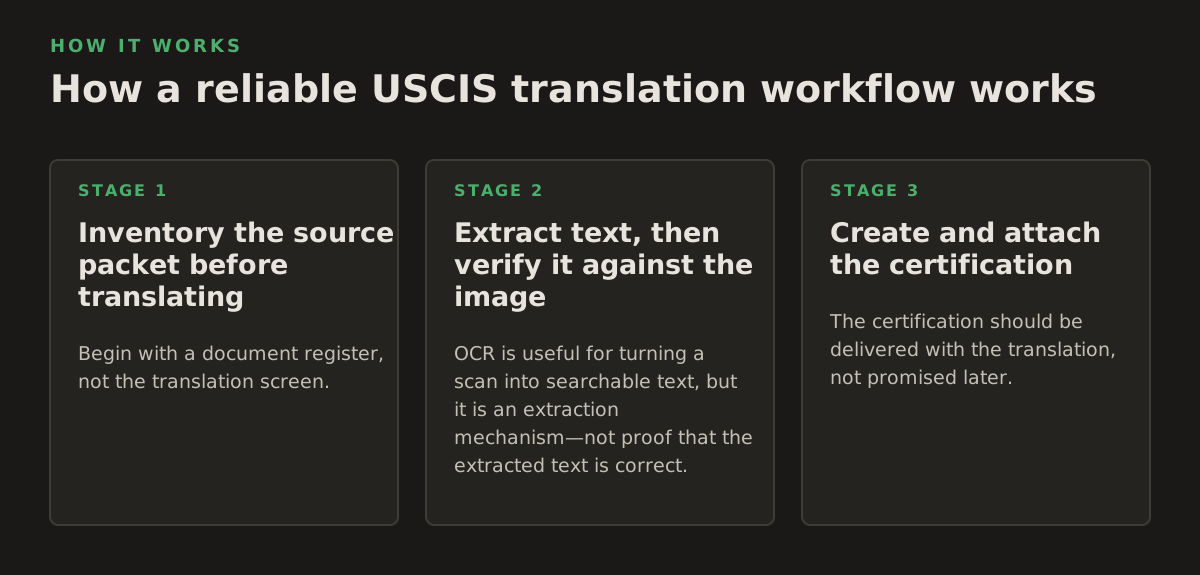
A defensible workflow separates extraction, translation, certification, and review. Combining all four in one rushed pass is how missing pages, OCR substitutions, and inconsistent names enter a filing.
1. Inventory the source packet before translating
Begin with a document register, not the translation screen. Record the file name, number of pages, language, document type, source quality, and intended exhibit label. For a family-based petition, the register might include a civil certificate, divorce decree, identity document, and address record. For an employment case, it might include a degree, transcript, professional license, and experience letter.
Mark pages that are blank, duplicated, upside down, partially cut off, or written in more than one language. If the source packet contains a page that is entirely in English, decide whether it belongs in the exhibit and keep the page sequence understandable.
2. Extract text, then verify it against the image
OCR is useful for turning a scan into searchable text, but it is an extraction mechanism—not proof that the extracted text is correct. Recognition errors commonly occur with low contrast, decorative typefaces, stamps, handwriting, diacritics, and multi-column tables. The original image remains the authority.
A practical review sequence is:
- Run OCR or import the digital text to create a working draft.
- Compare every proper noun and number against the page image.
- Inspect seals, signatures, and handwritten notes separately from the machine-readable text.
- Translate the verified content while preserving headings, tables, and page relationships.
- Perform a second comparison after formatting, because text can be lost when a table or text box is rearranged.
For a clean, digitally generated PDF, OCR may be unnecessary. For a scan, OCR is often the fastest starting point, but a human should review every line that affects identity, eligibility, chronology, or the interpretation of an adverse event.
3. Create and attach the certification
The certification should be delivered with the translation, not promised later. It should make clear which language was translated and should be signed and dated by the translator. If several documents are translated together, identify the documents or exhibit range covered by the certification so that its scope is unambiguous.
A law office may use an established certification template, but the template should not conceal who performed the work. If an AI system produced a draft, the named translator still needs to review the source, correct the output, and certify the final translation only if the translator can honestly attest to its completeness and accuracy.
Where automated and OCR-based translation breaks
Automation is most useful when the source is repetitive, legible, and structurally regular. It becomes less reliable when meaning depends on visual context or when a small character-level error changes the legal significance of the document.
Common failure modes
- OCR substitutions: “1” becomes “I,” “0” becomes “O,” or a diacritic disappears from a name.
- Column collapse: a transcript’s grades are attached to the wrong course after extraction.
- Seal omission: a stamp is treated as decoration even though it identifies the issuing authority or date.
- Handwriting loss: marginal notes, corrections, and signatures are skipped because they are not machine-readable.
- False certainty: an unclear word is translated as though it were legible instead of being marked for review.
- Inconsistent terminology: the same agency, relationship, or legal status receives different English terms across exhibits.
These failures are not limited to immigration work. A healthcare record may contain an abbreviated diagnosis; an academic transcript may use local grading terminology; a court record may distinguish a complaint, order, and final judgment with words that look similar in casual translation. The reviewer needs domain context as well as language ability.
Do not use formatting fidelity as a proxy for accuracy. A polished PDF can still contain an incorrect date. Conversely, a plain but carefully checked translation can be more reliable than a visually impressive document. The correct quality control question is whether each meaningful source element has a faithful English counterpart or an explicit notation explaining why it cannot be read.
How legal and operations teams should apply the process
The right workflow depends on the filing’s risk, the source material, and who owns the final review. A law firm may centralize terminology and certification; a university may need consistent handling of transcripts and degree records; a healthcare or government team may need restricted access and a documented chain of custody.
Use a risk-based review plan
Not every page deserves the same review intensity, although every page should be accounted for. As an illustrative starting policy—not a USCIS rule—teams could classify documents like this:
| Source type | Primary risk | Review emphasis |
|---|---|---|
| Birth, marriage, or death record | Identity and relationship mismatch | Names, dates, registration details, annotations, seals |
| Court order or police record | Wrong procedural meaning | Disposition, charges, dates, case number, court identity |
| Academic transcript | Table and grading errors | Course-to-grade alignment, degree title, credits, scale notes |
| Medical or vaccination record | Abbreviation and handwriting errors | Dates, vaccine names, provider details, handwritten entries |
| Business or employment evidence | Role, compensation, and chronology errors | Job title, dates, currency, company names, signatures |
For country-specific civil-document practices, consult the U.S. Department of State’s Visa Reciprocity and Civil Documents by Country resource. It can help a legal team understand what a particular record is, where it is issued, and whether local document practices affect evidence planning; it does not replace the translation requirement or the filing instructions for the relevant USCIS form.
Build a final packet check
Before submission, assign one person to review the packet as a filing—not merely the translation as a language product. The check should include:
- Every foreign-language page has a corresponding English translation or a documented reason it is not translated.
- The translation preserves the source page order and identifies pages clearly.
- The certification is signed, dated, and tied to the translated documents.
- Names, dates, numbers, addresses, and case identifiers match the source image.
- Tables, seals, handwritten notes, and marginal annotations are represented or described.
- The final PDF opens correctly, pages are not clipped, and exhibits are labeled consistently.
Keep the original files, the final translated version, and the certification together in the matter record. If an officer later asks for clarification, the team should be able to show which source page supports each translated statement. That traceability is especially valuable when a case includes multiple versions of a civil record or documents produced at different times.
A practical recommendation for 2026 workflows
Use automation to reduce transcription and formatting work, but reserve human judgment for the parts that affect legal meaning: identity, chronology, eligibility, adverse records, and ambiguous text. For straightforward digital documents, a competent translator can often work from an extracted draft with targeted visual checks. For scans, handwriting, seals, multi-column tables, and poor-quality copies, plan for full page-by-page comparison and a second reviewer when the document is central to the case.
Most importantly, treat the certification as an accountability step, not a decorative final page. The person who signs it should be able to explain how the source was reviewed and should decline to certify content that remains unreadable or incomplete. InOtherWord.AI can help teams translate PDFs, scanned PDFs, DOCX files, PowerPoint presentations, and EPUB books while retaining useful document structure; use it as part of a review-controlled workflow, then have the qualified translator certify the final USCIS exhibit through InOtherWord.AI.
Authored with NotFair SEO
Related guides
Keep researching the right workflow
These pages help move from general document-translation research into the specific file format or workflow you need.
A practical workflow for translating scanned PDFs with OCR while preserving enough structure for real review, sharing, and downstream editing.
Explore pageHow to translate PPT and PPTX decks without breaking slide layouts, charts, and speaker-ready formatting.
Explore pageThe best AI PDF translator is not just about language quality. It also needs OCR, layout preservation, and reviewable output for real files.
Explore pageCommercial pages
Ready to translate the actual file?
Jump from the guide into the product page that fits your document type, then continue into pricing when you are ready.
Format page
Translate PDF Documents
Translate PDF files while preserving layout, tables, and page structure.
Explore pageFormat page
Translate Scanned PDFs
OCR and translate scanned PDFs without rebuilding the layout by hand.
Explore pageFormat page
Translate PowerPoint Presentations
Translate PPT and PPTX decks while preserving slide layouts, tables, and speaker-ready formatting.
Explore pageTranslate layout-heavy PDF reports, manuals, forms, and client-ready files while keeping tables, headings, and images readable.
Explore page