Google Translate Ocr: What It Does, Where It Breaks, and How to Translate Documents
Published Sat Sep 05 2026 | 15 min read
Google Translate OCR can read images, but document teams need more. Learn workflows, limits, quality checks, and when to use layout-preserving translation.
Google Translate OCR usually refers to using Google’s optical character recognition capabilities to read text from an image or scanned document and then translate that extracted text. It is useful for a quick sign, screenshot, photograph, or short page, but it is not automatically the same as producing a reliable, formatted translation of a contract, research paper, medical record, or book.
That distinction matters because OCR and translation solve different problems. OCR identifies characters and words in pixels; machine translation converts those words into another language. A document workflow must also preserve reading order, tables, footnotes, headings, page numbers, signatures, and visual warnings. If the first stage misreads a clause or assigns a table cell to the wrong row, fluent translation can make the original error harder to notice.
What “Google Translate Ocr” actually means
Google Translate can translate text supplied as typed or pasted content, and its image-related features can recognize text in visual material for translation. Google’s official help explains that image translation is intended for text appearing in images, while the exact experience depends on the device, app, and supported language direction; consult the current product instructions rather than assuming every desktop workflow has the same camera function. Google’s image translation guidance is the appropriate reference for the consumer feature as of 2026.
OCR is an extraction layer, not a complete document conversion
A scanned PDF is often just a collection of page images. It may look like selectable text to a person while containing no usable character layer for software. OCR analyzes the pixels and produces text, coordinates, confidence values, or a searchable layer. A translation engine then receives some representation of that result.
There are three different outputs that people commonly confuse:
- Recognized text: the words recovered from the image, usually as plain text or a searchable PDF layer.
- Translated text: the recovered words converted into the target language, often without the original page design.
- Translated document: a reconstructed file in which text, tables, images, spacing, and page relationships have been deliberately handled.
Google Drive provides a useful illustration of the separation. Its help documentation describes converting image and PDF files into editable Google Docs text, with limitations around formatting and complex layouts. That conversion can help make content searchable or editable, but it should not be mistaken for a finished translated document. See the official Google Drive instructions for converting PDFs and images to text before treating the result as a production workflow.
Consumer image translation and document OCR have different jobs
Image translation is well suited to a restaurant notice, a photographed label, or a short screenshot where the user needs the gist quickly. A legal department translating a 70-page scanned agreement has different requirements: complete page coverage, stable terminology, traceability to the source, and a way to inspect the original beside the translation.
For a document team, the practical question is therefore not “Can Google Translate OCR read this?” It is:
- Can the system detect every page and every text region?
- Can it preserve the correct reading order?
- Can a reviewer identify uncertain or missing text?
- Can the output retain tables, headers, footers, and figures?
- Can the translated file be delivered in the required format?
Why OCR quality changes the translation decision
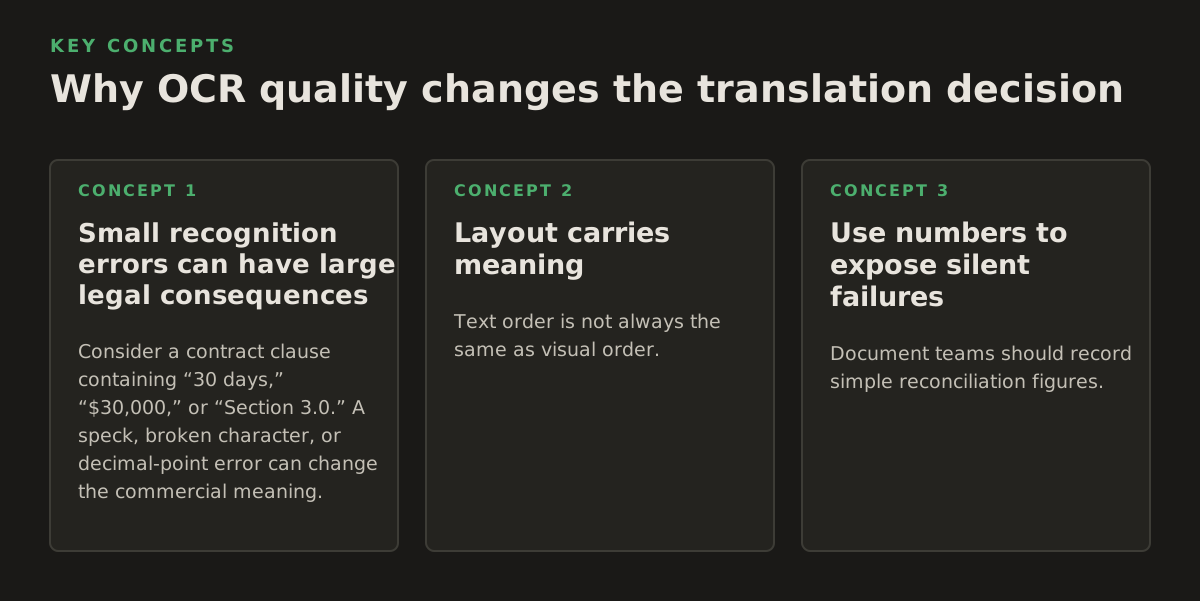
OCR errors are not evenly distributed. A clean, high-resolution page with a single language and strong contrast may produce useful text. A faxed court filing, a two-column journal article, or a photocopied medical form creates more opportunities for recognition errors. Translation quality cannot repair incorrect source text; it can only transform what it receives.
Small recognition errors can have large legal consequences
Consider a contract clause containing “30 days,” “$30,000,” or “Section 3.0.” A speck, broken character, or decimal-point error can change the commercial meaning. In a court document, a negation such as “not” may be faint or joined to a neighboring word. In a medical record, an abbreviation or dosage must not be guessed from visual context.
For these documents, OCR should be treated as a draft transcription requiring verification, not as evidence that the source has been read correctly. The reviewer should compare the translated output against the page image, especially around numbers, names, dates, citations, and defined terms.
Layout carries meaning
Text order is not always the same as visual order. A page may contain a sidebar, a footnote, a stamp, a handwritten annotation, and a two-column body. A simple extraction process can return the sidebar before the heading, merge two columns, or place a footer inside a sentence.
Tables create another problem. OCR may recognize every cell but lose the row and column relationships. Translating the extracted words separately can produce a linguistically correct list that is operationally wrong. In a financial report, for example, a number moved one column to the left changes which account it describes.
| Source characteristic | Likely OCR risk | Review priority |
|---|---|---|
| Clear printed page, one column | Missed punctuation or symbols | Names, numbers, dates |
| Two-column academic paper | Incorrect reading order | Headings, references, equations |
| Scanned contract with seals | Confusion between text and marks | Defined terms, signatures, clauses |
| Spreadsheet-like form | Lost cell relationships | Every row, column, and checkbox |
| Photograph or fax | Blur, skew, shadows, missing characters | Full visual comparison |
As a starting policy—not a universal benchmark—a team might permit direct machine translation only for low-consequence material after a spot check, while requiring page-by-page human review for contracts, filings, prescriptions, safety instructions, and records that will be submitted to an authority. Risk level should determine review depth, not the apparent fluency of the translated sentences.
Use numbers to expose silent failures
Document teams should record simple reconciliation figures. These do not prove that a translation is correct, but they reveal suspicious gaps. For example, compare the source and output for:
- 12 pages: confirm that the output contains 12 corresponding page sections or a documented explanation for excluded pages.
- 48 dates: check that all dates appear in the extracted text and were not silently dropped.
- 19 table rows: verify row count and key totals rather than trusting the translated table visually.
- 7 defined terms: search for each term in the output and confirm consistent translation.
- 34 citations: compare author names, publication years, and page references against the source.
These are illustrative control examples, not accuracy guarantees. Their value is that they turn “the document looks fine” into checks that another reviewer can repeat.
How an OCR translation workflow works
A dependable workflow treats recognition, translation, reconstruction, and quality assurance as separate stages. Some platforms combine them behind one upload button, but the underlying decisions still exist. If a result is wrong, the team needs to know which stage failed.
1. Inspect the source before uploading
First determine whether the file already contains a text layer. Try selecting and copying a paragraph, search for a distinctive word, and inspect whether copied text follows the visible reading order. A PDF can contain both an image and an imperfect hidden OCR layer, so successful selection alone does not prove correctness.
Record basic source properties:
- File type and approximate page count
- Source and target languages, including regional variants
- Presence of handwriting, stamps, signatures, or marginal notes
- Number of columns, tables, forms, and embedded images
- Whether the output must remain PDF, DOCX, PowerPoint, or EPUB
- Whether the file contains confidential, regulated, or privileged information
This inventory determines whether a quick image translation is appropriate or whether the job needs a document-focused system with OCR and layout reconstruction.
2. Recognize text while preserving coordinates
Modern OCR systems can return more than a text string. They may identify pages, blocks, lines, words, and bounding boxes. Those coordinates help a reconstruction engine place translated text near the source location. Without positional data, it is much harder to preserve columns, captions, table cells, or labels.
Google Cloud’s documentation separates optical character recognition from translation and describes text detection capabilities for printed and, in relevant services, handwritten content. Its Cloud Vision OCR documentation is useful when evaluating recognition as a technical component rather than assuming that a consumer translation screen is a full document pipeline. The important architectural point is that **OCR output includes structure and uncertainty**, not merely a clean paragraph.
3. Normalize without destroying evidence
Normalization can correct obvious encoding problems, join words split at line endings, and standardize whitespace. It can also cause damage. Removing line breaks may destroy poetry, legal numbering, or a form’s visual logic. Converting all punctuation to one style can alter a citation or a decimal number.
A safe process keeps two representations:
- An evidence-preserving OCR layer tied to the original page and coordinates.
- A translation-ready text layer with carefully documented normalization.
When a reviewer questions a translated phrase, the team should be able to trace it back to the source image and the recognized text, rather than relying on a flattened final file.
4. Translate with document context
Translation engines perform better when sentences are not broken into isolated fragments. A heading, table label, and footnote may require different treatment from ordinary prose. Terminology also needs control: a university department, statutory phrase, product name, or drug name should not change translation merely because its surrounding sentence changes.
A useful terminology process includes:
- Extracting recurring names, acronyms, and defined terms before translation
- Marking terms that must remain unchanged
- Specifying preferred target-language equivalents
- Checking whether dates, currencies, and measurement units should be localized
- Reviewing ambiguous terms with a subject-matter expert
Google Cloud documents translation as a separate service from OCR, which reinforces the practical need to decide how extracted text will be passed into translation and how document structure will be retained. The Google Cloud Translation overview describes the translation service’s role; it does not by itself establish that a consumer image-translation interaction will preserve a complex file’s layout.
5. Reconstruct and inspect the output
Reconstruction is where many “translated documents” become unusable. Target languages can expand or contract text, change line breaks, and require different font coverage. A translated table may need wider columns; a PowerPoint text box may overflow; an EPUB chapter may require updated navigation.
Quality assurance should include both linguistic and visual passes:
- Linguistic pass: names, terminology, numbers, negations, dates, and omissions.
- Visual pass: clipping, overlap, missing characters, blank pages, table alignment, and reading order.
- Functional pass: search, copy, page navigation, links, bookmarks, and screen-reader behavior where relevant.
For technical context, Microsoft’s official overview of its OCR capabilities also describes recognition across printed and handwritten text and emphasizes that OCR is a vision task distinct from language translation. See the OCR overview in Microsoft’s documentation for a second primary-source explanation of the separation between text recognition and downstream processing.
Where Google Translate Ocr breaks down
The most important limitations are not usually dramatic crashes. They are silent omissions, plausible substitutions, and layout changes that a busy reviewer may miss. Fluent output is not proof of complete input.
Image quality and typography
Low resolution, skew, glare, compression artifacts, bleed-through, and uneven lighting all reduce character separation. Decorative fonts, small footnotes, vertical writing, and mixed scripts add complexity. A page that is readable to a human at full size may be too ambiguous after an upload or automatic resize.
Preprocessing can help, but it is not magic. Cropping borders, rotating a page, increasing contrast, and separating dense pages may improve recognition. Excessive sharpening can create false strokes, while aggressive thresholding can erase thin punctuation. Keep the original file and document every preprocessing step.
Handwriting, seals, and annotations
Handwritten notes are particularly risky because character shapes vary and context encourages the system to make a plausible guess. A seal can be mistaken for a letter; a signature should not be treated as ordinary text; a handwritten alteration may carry legal significance even if it is not translated.
Mark uncertain regions for a qualified reviewer. Do not silently omit them from the deliverable. For a court filing or clinical record, the correct representation may be a transcription note, a retained image, or escalation to a specialist—not an invented text string.
Tables, columns, equations, and reading order
OCR can recognize text while misunderstanding relationships. A two-column paper may become one interleaved paragraph. An equation may be reduced to ordinary characters. A table may lose merged cells and row headers. Footnotes can appear in the middle of the main argument.
Researchers should be especially cautious with references and formulas. A translated abstract may be acceptable for discovery, while a methods section, dataset description, or quoted result needs source-level checking. Publishers should preserve the original page image or an auditable parallel version whenever layout carries editorial meaning.
Language and domain ambiguity
Short text provides little context. A single word on a form may have several valid translations depending on whether it labels a field, describes an action, or names a legal status. OCR may also misidentify a language when a page contains multiple scripts or a small amount of text.
Domain review is essential for:
- Contractual obligations, exceptions, and defined terms
- Clinical instructions, dosages, and contraindications
- Government forms, identity fields, and administrative categories
- Academic terminology, quotations, and bibliographic references
- Religious, historical, or cultural language where wording has interpretive significance
Privacy, retention, and chain of custody
OCR and translation can involve uploading source material to a service. The appropriate decision depends on the organization’s contractual terms, configuration, retention controls, access model, and applicable law. Do not infer confidentiality from the presence of a lock icon or from a service being widely used.
Before processing sensitive files, establish:
- Who is authorized to upload and download the document
- What the organization’s policy permits for external processing
- Whether the original and derived files must be retained or deleted
- How reviewers will record changes and approvals
- Whether a certified translation, sworn statement, or human sign-off is required
How practitioners should apply OCR translation
The right workflow depends on the consequence of being wrong and on the form of the required output. A quick image translation and a formatted, reviewable document are different products.
Legal teams
Use OCR translation for discovery and triage when a multilingual matter contains many scanned exhibits. Searchable text can help identify relevant pages, repeated names, dates, and clauses. For filing, advice, negotiation, or evidence, retain the original images and create a review path that maps each translated passage to its source page.
A practical legal checklist is:
- Separate machine-translated working copies from official translated documents.
- Flag handwritten changes, stamps, seals, and marginal notes.
- Verify every monetary amount, deadline, section reference, and party name.
- Have a qualified linguist or attorney review dispositive language.
- Preserve the original page order and an audit record of corrections.
When the deliverable must remain a readable PDF, a document-focused service can be more suitable than copying image text into a chat box. InOtherWord.AI’s workflow for translate PDF documents is aimed at retaining document structure during translation rather than returning only a block of extracted text.
Researchers and universities
Researchers often need two different outputs: a rapid translation for literature screening and a dependable version for citation or close reading. OCR can accelerate the first task, but equations, footnotes, captions, and references deserve separate checks before publication or scholarly quotation.
For a journal article, compare the following before relying on the translation:
- Title, authors, affiliations, and abstract
- Section headings and the order of columns
- Sample sizes, units, confidence intervals, and p-values
- Figure labels, table headings, and footnotes
- Quoted material and bibliographic references
If the file is a scanned book or archival source, retain page images alongside the translated text. OCR can make an archive searchable without claiming that every historical typeface or marginal note has been perfectly interpreted.
Businesses, publishers, educators, government, and healthcare
Business teams can use OCR translation to understand incoming reports, invoices, and photographed documents, then route high-value material for review. Publishers and educators should inspect chapter hierarchy, page breaks, captions, exercises, and accessibility features. Government teams need stronger controls around forms, identity data, and official terminology. Healthcare teams should treat patient-facing instructions and clinical records as high-consequence content.
For scanned files specifically, a workflow designed to translate scanned PDFs is preferable when the source has no usable text layer and the output must remain a coherent document. The goal is not merely to recognize words; it is to combine extraction, translation, reconstruction, and review.
A decision rule for choosing the workflow
Use the following as an illustrative starting policy, then adapt it to organizational requirements:
- Low consequence, short image: use image translation for orientation, then discard or separately verify the result.
- Medium consequence, searchable document: run OCR, translate, and reconcile pages, headings, names, and numbers.
- High consequence, structured document: use layout-preserving document translation with terminology controls and human review.
- Official or regulated output: confirm whether a qualified or certified human translation is required before delivery.
Do not choose solely by file extension. A PDF may be a clean digital document, a stack of photographs, or a mixed file with text on some pages and images on others. Inspect the actual content and the intended use.
Recommendation: treat Google Translate Ocr as triage, not the whole pipeline
Google Translate OCR is valuable when the job is to understand a small amount of text inside an image quickly. It becomes inadequate when the job is to deliver a complete, reviewable document whose formatting and source relationships matter. The dividing line is not whether the translation sounds natural; it is whether the workflow can demonstrate that the right text was recognized, translated, placed, and checked.
For business, legal, academic, publishing, government, and healthcare teams, adopt a simple control: separate OCR validation from translation review. First confirm coverage, reading order, and critical source details. Then assess terminology, meaning, and target-language quality. Finally inspect the reconstructed file visually and functionally.
When your source is a scanned PDF or another complex document, InOtherWord.AI can help combine OCR, translation, and formatting preservation in one document-oriented workflow. See InOtherWord.AI for the platform’s supported document translation use cases.
Authored with NotFair SEO
Related guides
Keep researching the right workflow
These pages help move from general document-translation research into the specific file format or workflow you need.
A practical workflow for translating scanned PDFs with OCR while preserving enough structure for real review, sharing, and downstream editing.
Explore pageHow to translate PPT and PPTX decks without breaking slide layouts, charts, and speaker-ready formatting.
Explore pageThe best AI PDF translator is not just about language quality. It also needs OCR, layout preservation, and reviewable output for real files.
Explore pageCommercial pages
Ready to translate the actual file?
Jump from the guide into the product page that fits your document type, then continue into pricing when you are ready.
Format page
Translate PDF Documents
Translate PDF files while preserving layout, tables, and page structure.
Explore pageFormat page
Translate Scanned PDFs
OCR and translate scanned PDFs without rebuilding the layout by hand.
Explore pageFormat page
Translate PowerPoint Presentations
Translate PPT and PPTX decks while preserving slide layouts, tables, and speaker-ready formatting.
Explore pageTranslate layout-heavy PDF reports, manuals, forms, and client-ready files while keeping tables, headings, and images readable.
Explore page