Legal Document Translation: A Workflow for Accurate, Reviewable Files
Published Tue Sep 29 2026 | 8 min read
Legal document translation: prepare contracts, filings, and records with a workflow for checking terminology, preserving layout, and meeting recipient requireme
Legal document translation is the conversion of a legal or law-related document into another language while preserving its meaning, structure, and evidentiary details. For legal teams, a sound workflow pairs translation with qualified human review and checks the receiving court, agency, or counterparty’s requirements; software can speed up a draft, but it cannot establish that a translation will be accepted or legally sufficient.
What Legal Document Translation includes
The work is more than replacing words. A translator must preserve the relationships that make a document usable: who owes what to whom, which exception applies, what dates or amounts are specified, and how a clause connects to the rest of the instrument. The translated file should also make it possible to locate the corresponding passage in the original.
Meaning and legal effect are not interchangeable. A phrase may have no direct equivalent in the target legal system. The translator’s job is to convey the source text accurately, not silently adapt it to make it resemble a local law or contract. If an adaptation is needed, legal counsel should decide and document that separately.
Typical assignments include:
- Contracts, amendments, powers of attorney, and corporate records for review or negotiation.
- Pleadings, exhibits, judgments, and evidence intended for a court or tribunal.
- Immigration, civil-status, and administrative records submitted to a government agency.
- Medical records, consent forms, and research materials where legal obligations and technical terminology overlap.
“Legal translation” does not itself specify a certification level. Requirements depend on the intended recipient and use. For example, U.S. immigration regulations require a foreign-language document submitted to USCIS to be accompanied by a full English translation and a translator’s certification of completeness, accuracy, and competence; that rule is specific to that filing context, not a universal standard for every legal document (8 CFR 103.2(b)(3)).
Why the recipient and use change the workflow
A translation prepared for internal contract review may be useful as a working draft, while a translation submitted as evidence may need a prescribed format, a signed certification, or a particular translator qualification. Do not infer acceptance from a label such as “certified” alone: confirm the actual requirement with the receiving institution or counsel before commissioning the work.
Start with the decision the translation must support. A legal team reviewing an overseas supplier agreement needs clause-level accuracy and reliable cross-references. A party filing a translated birth certificate needs to satisfy the agency’s submission rules. A researcher translating a judgment for a comparative-law paper may need traceable terminology and citations, but not the same certification as a court filing.
Before work begins, record these details in the assignment brief:
- Destination: the named court, agency, client, or internal team.
- Purpose: filing, negotiation, disclosure, research, or information only.
- Language and locale: include the requested regional variant where relevant.
- Required credentials: certification, notarization, sworn status, or other recipient-specific condition.
- Delivery form: editable file, searchable PDF, signed paper copy, or a specified combination.
- Deadline and review owner: identify who resolves legal or terminology questions.
Rules may be narrower than a project team expects. The Federal Rules of Evidence, for instance, address interpreters in court and require an interpreter to be qualified and to take an oath or affirmation to make a true translation; that provision concerns interpretation under the rules, so it should not be treated as a blanket specification for written-document translation (Federal Rule of Evidence 604).
How to run a reviewable translation workflow
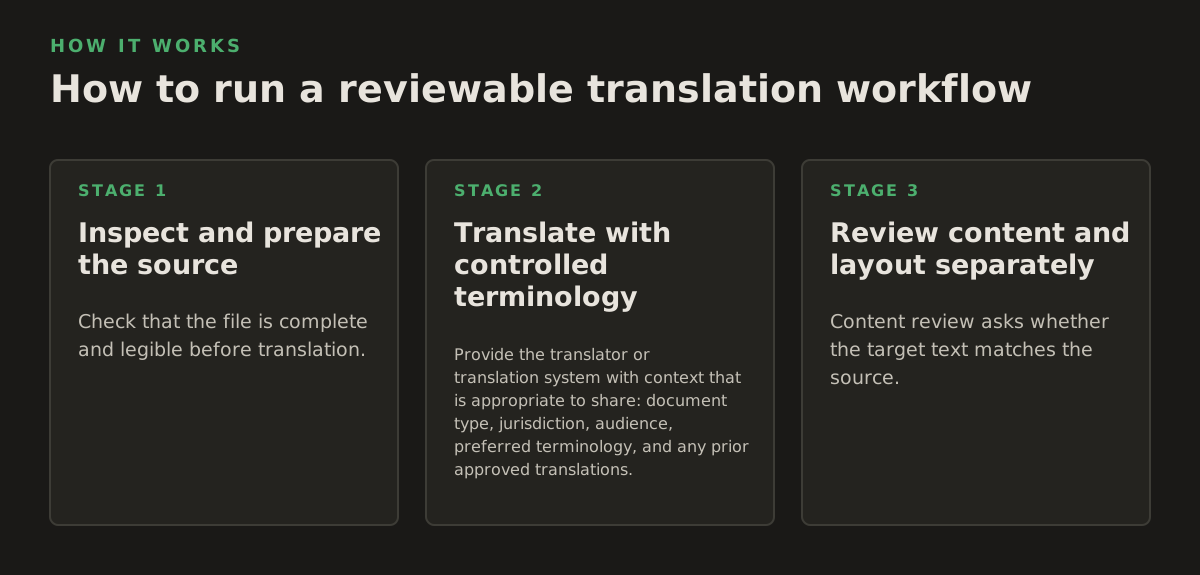
A reliable process separates the source file, translation, and approval decisions. That separation lets a reviewer tell whether a discrepancy came from the source, text extraction, translation, or later editing. Keep the original unchanged, assign a stable filename or matter identifier, and record the language direction and version of every file.
1. Inspect and prepare the source
Check that the file is complete and legible before translation. Look for missing pages, handwritten additions, stamps, signatures, faint text, rotated scans, and tables that break across pages. For a scanned PDF, OCR can make text searchable and editable, but extracted text is only a working layer: compare it against the page image, especially for names, dates, amounts, and negations. Teams handling image-only files can translate scanned PDFs; for text-based files, a workflow to translate PDF documents can help retain the document’s visual structure.
Use a short intake checklist rather than relying on the file extension:
- Confirm page count and sequence against the original.
- Note illegible areas instead of guessing at their contents.
- Identify repeated defined terms, abbreviations, and reference numbers.
- Separate source text from seals, annotations, and handwritten notes that need distinct treatment.
2. Translate with controlled terminology
Provide the translator or translation system with context that is appropriate to share: document type, jurisdiction, audience, preferred terminology, and any prior approved translations. Maintain a term list for names of entities, defined terms, agency names, and recurring legal concepts. When a term has no clean equivalent, flag it for review rather than choosing a plausible-sounding substitute without explanation.
AI translation can produce a useful draft across document types, but its fluency is not proof of legal accuracy. A human reviewer should compare material passages with the source and resolve ambiguous terms in context. Risk-management guidance from NIST recommends considering the context and potential effects of AI use across its lifecycle; it is a general framework, not a legal-translation certification standard (NIST AI Risk Management Framework).
3. Review content and layout separately
Content review asks whether the target text matches the source. Layout review asks whether the translated document remains readable and navigable. Treating these as separate checks catches problems that spell-checking will not.
For example, a reviewer might mark issues like these:
- Clause 4.2: verify that “unless” was not changed to “if,” which can reverse a condition.
- Schedule 1: compare all 12 listed amounts with the source, including decimal separators and currency labels.
- Exhibit B: confirm that page 7’s footnote remains attached to the referenced table.
- Party name: check the spelling against the source and the matter’s approved entity record.
These are illustrative review examples, not universal thresholds. Scale review to the document’s use and risk; one incorrect figure in a financial schedule may matter more than many cosmetic differences in spacing.
Where translation and document tools can break
Every stage can introduce errors. OCR can confuse characters, especially in low-resolution scans or dense tables. Translation can flatten distinctions among defined terms. Reflow can move a signature block, detach a footnote, or make a translated page refer to the wrong exhibit. A polished appearance does not establish that the text is correct.
Flag uncertainty instead of concealing it. If a seal, handwritten note, or source phrase is unreadable, mark the location and ask the document owner how it should be represented. Do not reconstruct missing text from context unless an authorized reviewer approves that approach and the translation clearly identifies the reconstruction.
Common failure points include:
- Names and identifiers: transliteration may vary; preserve source spelling where required and use a consistent approved form.
- Dates and numbers: formats differ across locales; verify the underlying value rather than trusting visual similarity.
- Tables and forms: merged cells and narrow columns can hide text or associate an answer with the wrong question.
- References: article numbers, citations, exhibit labels, and cross-references may be damaged during editing or reflow.
- Stamps and annotations: OCR may omit content that appears only as an image or handwritten mark.
Acceptance rules also vary across borders and document types. The European e-Justice portal explains that EU rules simplify the circulation of certain public documents between EU countries, but the scope and procedures depend on the document and applicable rules; do not assume this eliminates translation or recipient-specific requirements (European e-Justice: public documents).
Finally, document confidentiality is a separate decision from translation quality. Before uploading a matter file to any service, legal teams should follow their organization’s policies and assess the data involved, authorized access, retention, and any contractual restrictions. Do not claim a tool is suitable for privileged or regulated material without verifying its applicable terms and controls.
How legal teams apply the process
Match review effort to what could go wrong and who will rely on the result. A contract negotiation, an evidentiary filing, and an academic comparison do not have identical approval paths. The responsible lawyer or project lead should set the acceptance criteria before translation, not after a reviewer discovers that the recipient expects a different form.
A practical assignment matrix can make the decision explicit:
| Use case | Primary check | Decision to confirm |
|---|---|---|
| Contract review | Defined terms, obligations, exceptions, amounts | Is this for internal understanding or an agreed bilingual instrument? |
| Court or agency filing | Completeness, certification, exhibit and page references | What does the named recipient require? |
| Research or publication | Terminology, citations, and traceability to the source | Does the publication need notes for uncertain or jurisdiction-specific terms? |
| Healthcare or government record | Identifiers, dates, forms, and confidentiality handling | Who is authorized to review and approve the translated record? |
For documents that need human sign-off, keep a concise review record. It need not reproduce privileged analysis; it should show the source version, target version, reviewer, unresolved issues, and approval status according to the organization’s matter-handling rules. That record helps a later reviewer distinguish approved wording from an unreviewed draft.
Recommended starting policy: use AI or OCR to accelerate preparation where permitted, then require a qualified human review for material intended for external legal reliance. Confirm the recipient’s format and certification rules, compare high-consequence details against the source, and retain unresolved ambiguities for counsel rather than resolving them by guesswork. InOtherWord.AI translates PDFs, scanned PDFs, DOCX files, PowerPoint presentations, and EPUB books while preserving document structure; teams can review its options at InOtherWord.AI.
Authored with NotFair SEO
Related guides
Keep researching the right workflow
These pages help move from general document-translation research into the specific file format or workflow you need.
A practical workflow for translating scanned PDFs with OCR while preserving enough structure for real review, sharing, and downstream editing.
Explore pageHow to translate PPT and PPTX decks without breaking slide layouts, charts, and speaker-ready formatting.
Explore pageThe best AI PDF translator is not just about language quality. It also needs OCR, layout preservation, and reviewable output for real files.
Explore pageCommercial pages
Ready to translate the actual file?
Jump from the guide into the product page that fits your document type, then continue into pricing when you are ready.
Format page
Translate PDF Documents
Translate PDF files while preserving layout, tables, and page structure.
Explore pageFormat page
Translate Scanned PDFs
OCR and translate scanned PDFs without rebuilding the layout by hand.
Explore pageFormat page
Translate PowerPoint Presentations
Translate PPT and PPTX decks while preserving slide layouts, tables, and speaker-ready formatting.
Explore pageTranslate layout-heavy PDF reports, manuals, forms, and client-ready files while keeping tables, headings, and images readable.
Explore page