AI Earbuds Translation: How It Works and Where It Falls Short
Published Thu Oct 01 2026 | 9 min read
Learn how ai earbuds translation works, where speech-to-speech tools fail, and when legal, research, and healthcare teams need reviewed document translation.
AI earbuds translation turns spoken words in one language into spoken or displayed words in another, usually through earbuds paired with a phone. It can help a legal team handle a first conversation with a visitor or help a researcher follow a casual exchange, but it is not a dependable substitute for a qualified interpreter in high-stakes discussions. For contracts, journal articles, policies, and other written records, use a document translation workflow that can preserve structure and support review.
What AI Earbuds Translation is—and what it is not
The phrase describes a speech translation system in which earbuds deliver audio, a companion device or service processes the conversation, and the translated result reaches the listener as audio, text, or both. The earbuds are only one part of the setup: the phone, app, microphone, speech-recognition model, translation model, and network connection may all affect what the user experiences.
That distinction matters when a team evaluates a device. Earbuds do not independently guarantee accurate translation. They may provide microphones and playback, while recognition and translation happen elsewhere. Product instructions can also vary by device, app, language pair, and settings. Google’s Pixel Buds guidance, for example, describes translation as a workflow involving Pixel Buds and Google Translate rather than an isolated earbud function (Google Pixel Buds translation instructions).
Most systems aim to turn live speech into a useful approximation of meaning, not a signed or certified record. They can help people coordinate, ask for directions, or understand the gist of a discussion. They do not automatically provide the safeguards associated with professional interpreting: confirmation of meaning, careful handling of ambiguity, and accountability for what was communicated.
Why teams use earbuds for live conversations
The main benefit is reduced friction. A user can hear a translated response without passing a phone back and forth or stopping to type every sentence. For a business team meeting a supplier, a researcher speaking with a community partner, or a clinic orienting a patient, that convenience can make an initial exchange easier. It is most useful when the goal is basic access and coordination, not a final decision based on exact wording.
Consider these illustrative situations. Each shows a possible use, not a guarantee of suitability:
- Conference check-in: A researcher asks where to collect a badge and hears the answer in their preferred language.
- Supplier visit: A business representative confirms a meeting room and asks which documents the supplier brought.
- Campus orientation: An educator gives a visitor simple directions to an office or lecture hall.
- Clinic reception: A staff member uses translation to establish the reason for a visit, then brings in a qualified interpreter for clinical history or consent.
- Legal intake: A legal team uses an initial exchange to identify the language needed, then arranges an interpreter before discussing advice, evidence, or terms.
Conversation mode is a feature of translation software as well as some earbud workflows. Google’s guidance for Translate conversation mode describes how participants can speak in turn and view translated conversation on a device (Google Translate conversation mode). The practical point is to check the actual interaction pattern before a meeting: some setups rely on a phone screen or speaker, so “earbud translation” may not mean both parties can simply talk without managing a device.
Use it to bridge a gap, not to establish an authoritative record. If a translated exchange affects a person’s rights, treatment, finances, research consent, or contractual obligations, teams should arrange appropriate language support and document the outcome through approved channels.
How the translation pipeline works
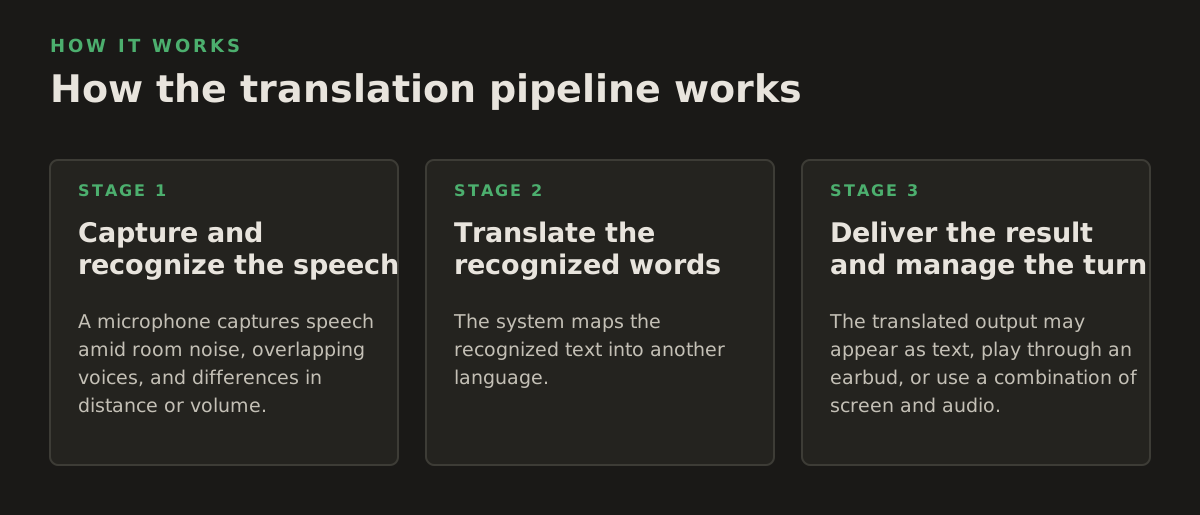
A live system typically performs a sequence of operations. Understanding the sequence helps teams spot the likely source of an error instead of assuming the translation model alone is responsible.
1. Capture and recognize the speech
A microphone captures speech amid room noise, overlapping voices, and differences in distance or volume. Speech recognition then estimates the spoken words. Google’s Speech-to-Text documentation describes converting audio into text and notes that recognition uses models and configuration suited to different audio and language needs (Google Cloud Speech-to-Text overview). If the first transcription misses a name, negation, number, or specialist term, later translation may confidently carry that error forward.
2. Translate the recognized words
The system maps the recognized text into another language. This is not simply a word-for-word substitution: grammar, context, idioms, and word sense can change the appropriate rendering. Google Cloud Translation documentation describes text translation and language-specific options, illustrating that translation is a distinct processing stage from audio recognition (Google Cloud Translation overview). In a conversation, short fragments and incomplete sentences make context especially thin.
3. Deliver the result and manage the turn
The translated output may appear as text, play through an earbud, or use a combination of screen and audio. Some speech translation architectures can produce translated speech as part of a speech service; Microsoft’s Azure Speech documentation describes speech translation capabilities and supported output modes (Microsoft speech translation documentation). Product behavior differs, so confirm which languages, directions, and interaction modes are supported in the specific setup rather than inferring them from the general label “AI translation.”
- Input quality: Is the microphone close enough to the speaker, and is there background conversation?
- Recognition: Did the system capture names, dates, amounts, and negations correctly?
- Translation: Does the target phrasing preserve the speaker’s intent and level of certainty?
- Output: Can the listener hear or read the result, and can they ask for clarification?
As of 2026, teams should treat these as separate checks. A smooth spoken output can sound authoritative even when an earlier stage misheard a key phrase. When a detail matters, repeat it in a simpler form, ask the speaker to confirm it, and record the confirmed information through the team’s normal process.
Where AI earbud translation breaks down
The failure mode is often not a dramatic mistranslation. It may be a small, plausible change: a date becomes a different date, a tentative statement sounds final, or a technical term is rendered as an everyday word. These errors are hard to notice if the listener cannot independently understand the source language. Fluent output is not proof of faithful output.
Pay particular attention to conditions that reduce the quality of the input or remove context:
- Overlapping speakers and noisy rooms: The system may attribute words to the wrong person or omit a short response.
- Accents, dialects, and uncommon language pairs: Recognition or translation quality may vary across languages and speaking styles; check the product’s supported languages and test the relevant pair in a low-risk setting.
- Specialist vocabulary: A medical abbreviation, legal term, research instrument, or product name may be unfamiliar to the system.
- Numbers and negation: “Fifteen” versus “fifty,” or “may” versus “may not,” can materially change the meaning.
- Long, interrupted explanations: A translation system may lose the thread when a speaker changes topic, refers back to an earlier point, or uses an idiom.
- Privacy and consent: Audio processing, storage, and data handling depend on the specific product and configuration. Review the applicable terms and organizational rules before capturing sensitive conversation.
For healthcare, legal, government, and research teams, the decision is not just whether a device can translate. It is whether the risk of misunderstanding is acceptable for that task, and whether the conversation includes confidential or protected information. Do not use a consumer workflow to handle sensitive material unless the organization has approved it for that purpose and staff understand its limits.
If a participant must understand a consent choice, a diagnosis, a legal right, or a binding obligation, pause and use qualified language support rather than relying on an unverified earbud translation.
How practitioners can use earbuds responsibly
Set the purpose before the conversation. A device that is adequate for directions may not be appropriate for a witness interview or a medical history. A short pre-meeting check also reveals practical problems—such as unsupported languages, poor audio, or a workflow that requires the other participant to use a screen.
- Classify the conversation. Mark it as low-stakes coordination, substantive discussion, or high-stakes communication. Route the latter two to the organization’s interpreter or language-access process when meaning has consequences.
- Check the exact language pair and setup. Confirm that the product supports the required direction of translation and test the phone, app, network, and audio before the meeting.
- Explain the tool to participants. Say that the translation is automated, ask whether they are comfortable using it, and offer another communication method where needed.
- Use short turns and confirmation. Speak one idea at a time. Repeat names, dates, quantities, and decisions, then ask the other person to confirm them in their own words or through an approved interpreter.
- Keep an appropriate record. Do not treat an automatically translated transcript as a verbatim or authoritative record. Follow the organization’s rules for notes, consent, retention, and access.
For example, a researcher can use earbuds to find a meeting room, but should arrange an interpreter or validated translated materials before obtaining informed consent. A business team can use them to establish which report a partner means, then review the report itself in a controlled translation workflow. The same division helps legal and government staff avoid turning an informal aid into evidence of a person’s exact words.
When the task is a document, switch to a document workflow
Earbuds translate a conversation in the moment; they are not designed to preserve the full structure of a contract, journal article, policy manual, presentation, or book. Those files can include headings, footnotes, tables, charts, citations, and scanned pages. Translating only a verbal summary may omit the very details a reviewer needs to verify.
For written material, choose a workflow that keeps the source file and translated output reviewable. InOtherWord.AI can translate PDF documents while preserving layout elements, and its scanned-file workflow can translate scanned PDFs using OCR to extract text from page images. For legal exhibits, research papers, and healthcare forms, check the translated text against the source, especially for names, numbers, tables, and specialized terminology.
Practical recommendation: use AI earbuds translation for low-risk, live orientation and coordination; use qualified interpreters for consequential conversations; and use a reviewable document translation process for records people must read, cite, sign, publish, or retain. When the job is translating a formatted document rather than a live exchange, InOtherWord.AI offers document translation for PDFs, scanned PDFs, DOCX files, PowerPoint presentations, and EPUB books.
Authored with NotFair SEO
Related guides
Keep researching the right workflow
These pages help move from general document-translation research into the specific file format or workflow you need.
A practical workflow for translating scanned PDFs with OCR while preserving enough structure for real review, sharing, and downstream editing.
Explore pageHow to translate PPT and PPTX decks without breaking slide layouts, charts, and speaker-ready formatting.
Explore pageThe best AI PDF translator is not just about language quality. It also needs OCR, layout preservation, and reviewable output for real files.
Explore pageCommercial pages
Ready to translate the actual file?
Jump from the guide into the product page that fits your document type, then continue into pricing when you are ready.
Format page
Translate PDF Documents
Translate PDF files while preserving layout, tables, and page structure.
Explore pageFormat page
Translate Scanned PDFs
OCR and translate scanned PDFs without rebuilding the layout by hand.
Explore pageFormat page
Translate PowerPoint Presentations
Translate PPT and PPTX decks while preserving slide layouts, tables, and speaker-ready formatting.
Explore pageTranslate layout-heavy PDF reports, manuals, forms, and client-ready files while keeping tables, headings, and images readable.
Explore page