What Is The Difference Between Translation And Transliteration? A Practical Guide
Published Mon Aug 31 2026 | 14 min read
What is the difference between translation and transliteration? Learn when legal, research, and document teams need meaning transfer, script conversion, or both
What is the difference between translation and transliteration when a contract, journal article, patient record, or book contains another writing system? Translation transfers meaning from one language to another; transliteration represents the characters or sounds of one script with characters from another. The two processes can appear together, but they solve different problems. A translated document tells a new-language reader what the source says. A transliterated name, address, or quotation helps a reader identify or pronounce material that remains tied to the original language.
That distinction affects more than word choice. It determines whether a court can interpret a clause, whether a researcher can find a cited author, whether a government form matches a passport, and whether a healthcare team can safely identify a medicine or patient. A document workflow that labels every Latin-character output “translation” can hide an important failure: the words may still mean exactly what they meant in the source, or they may have been changed into a different language altogether.
Translation changes meaning; transliteration changes representation
Translation is a meaning-transfer operation. It replaces a source-language expression with an expression in a target language, while attempting to preserve the relevant sense, function, tone, and legal or technical force. The source and target normally use different vocabularies and grammar. “The tenant shall maintain the premises” becomes an equivalent instruction in the target language, not a sequence of source-language sounds written with target characters.
Transliteration is a script-conversion operation. It maps writing from one script into another, usually according to a defined system. Arabic, Cyrillic, Greek, Devanagari, Hebrew, and Japanese can all be represented in Latin characters, but the result is not automatically English. A transliterated Arabic personal name remains an Arabic name represented in Latin script. A transliterated Russian sentence remains Russian, even though a reader may now be able to type or approximate its pronunciation.
“Romanization” is a related term for representing a non-Latin script in the Latin alphabet. It is often used for names, geographic locations, catalog records, maps, search fields, and identity documents. The exact output depends on the selected standard, language, and purpose. The Library of Congress overview of romanization describes romanization tables as tools for converting scripts into the Roman alphabet and notes that different languages require different rules.
| Question | Translation | Transliteration |
|---|---|---|
| What changes? | The language and wording | The script or written representation |
| What should remain? | The intended meaning and function | The source expression’s identifiable form or approximate sound |
| Typical use | Contracts, reports, instructions, articles, books | Names, addresses, citations, catalog records, search and data entry |
| Can the output be understood by a target-language reader? | Usually, if the translation is accurate and the reader knows the target language | Not necessarily; the output may only be pronounceable or searchable |
Consider the Japanese place name 東京. A translation might render it as “Tokyo,” which is the established English name. A transliteration system might produce “Tōkyō,” preserving a more explicit indication of the long vowels. Neither operation translates a full Japanese sentence by itself. Likewise, the Arabic word كتاب may be transliterated as kitāb, while its English translation is “book.” The first helps represent the source word; the second communicates its meaning.
- Chinese personal name: “李明” may be represented as “Li Ming” for an English-language record; that does not translate the person’s name into an English name.
- Russian title: “Война и мир” may be transliterated as “Voyna i mir,” but its English translation is “War and Peace.”
- Arabic address: a street name may be transliterated for a form while the surrounding instructions are translated.
- Hindi quotation: a researcher may provide the Devanagari original, a Latin transliteration, and an English translation as three separate layers.
The practical test is simple: if the reader needs the message, translate it; if the reader needs the source label, script, or searchable form, transliterate it. When both needs exist, preserve the original and provide both outputs with clear labels.
Why the distinction matters in professional documents
In a legal document, a transliterated party name can help match a passport, company registry, or prior filing. It cannot substitute for translating the obligations around that name. A contract clause written in Korean and rendered into Latin characters remains a Korean clause. A legal reviewer who cannot read Korean still needs a Korean-to-English translation, with the original retained for comparison and evidentiary control.
Names are identifiers, not ordinary vocabulary. Translating a person’s name can create a false identity, while transliterating it inconsistently can create duplicate records. The same individual may appear under different spellings because a system uses a phonetic rendering, a national standard, a passport convention, or a legacy database value. For legal and government work, capture the original script, the supplied official spelling, and any transliteration method used.
Academic and publishing workflows face a different problem: discoverability. A scholar may need an English translation of an article, but a cataloger may need a standardized romanized author name so that citations can be searched and grouped. The Library of Congress romanization guidance is useful here because it treats script conversion as a cataloging concern rather than as a replacement for semantic translation.
Healthcare adds a safety constraint. Transliteration can make a medicine, symptom, or patient name easier to enter into a Latin-script system, but it can also create near-matches. A transliterated drug name should not be treated as a clinical translation or as proof that two spellings refer to the same product. Human review should compare the original script, dosage, active ingredient, and surrounding clinical context.
Business teams often need three distinct outputs in one file:
- Meaningful translation for a board report, policy, sales proposal, or operating instruction.
- Transliteration for a customer name, subsidiary name, address, or product label that must remain identifiable.
- Original-script evidence for review, audit, legal validation, or later correction.
Government forms illustrate why labels matter. A field marked “Name in Latin characters” asks for a representation, not necessarily a translated name. A field marked “English name of institution” asks for a language equivalent, not merely a phonetic spelling. If a workflow merges those fields, downstream staff may mistake a transliteration for an official English designation.
There is also a search and data-quality consequence. Search systems may index an original-script form, a transliterated form, and a translated form as different strings. The correct solution is not to choose one universally. It is to store them as related values with their roles recorded. Do not overwrite the source with a transliteration; preserve the source so another standard or a human reviewer can reconstruct the decision.
How transliteration systems and translation workflows work
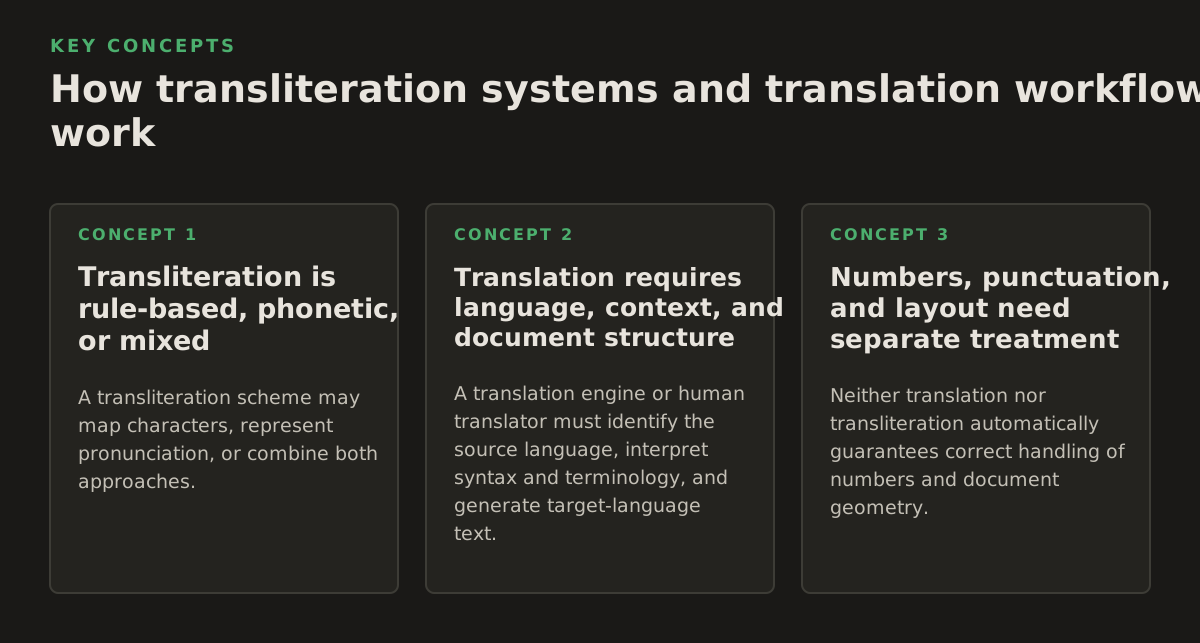
Transliteration is rule-based, phonetic, or mixed
A transliteration scheme may map characters, represent pronunciation, or combine both approaches. A strict character-based system aims for reversibility: a reader can map the Latin output back to the source script. A phonetic system aims for approximate pronunciation, which may be more useful for travelers or speakers but less useful for reconstructing the original. A practical library catalog, passport system, or search index may use a standard chosen for consistency rather than perfect pronunciation.
One source can therefore have multiple valid transliterations. The Cyrillic surname Шостакович may appear as “Shostakovich” in an established English form, while a more formal system might make different choices about vowels or soft signs. Neither spelling should be silently “corrected” without knowing the governing standard. For names, the person’s official document or stated preference can outrank a general-purpose transliteration table.
The Unicode Common Locale Data Repository material on transliteration explains transliteration as transformations between writing systems and distinguishes it from broader language translation. Unicode-related rules can support machine processing, but they do not decide which spelling is legally official, culturally preferred, or appropriate for a specific publication.
Translation requires language, context, and document structure
A translation engine or human translator must identify the source language, interpret syntax and terminology, and generate target-language text. In a document, that text also has to be placed back into headings, footnotes, tables, text boxes, captions, and page-level structures. A PDF may contain selectable text, embedded images, or only page scans. If the words are trapped in pixels, optical character recognition must happen before translation can reliably address them.
For scanned material, OCR is an extraction stage, not a translation stage. It recognizes visible marks and produces machine-readable text; translation then interprets that text. A poor OCR result can turn a name into a different name, lose diacritics, or split a table column. The Google Cloud Document AI OCR documentation describes OCR processing as extracting text and layout information from documents, which is a useful way to separate recognition from the later language operation.
A robust workflow keeps intermediate representations rather than treating the final file as the only artifact. For example, a scanned court exhibit may pass through these stages:
- Ingest the source: retain the original PDF and record page order, rotation, and obvious scan defects.
- Recognize the content: run OCR and flag uncertain characters, handwriting, stamps, seals, and marginal notes.
- Classify each string: distinguish prose, names, addresses, citations, product identifiers, and numbers.
- Choose the operation: translate prose, transliterate identifiers where required, and preserve original-script strings for verification.
- Review high-risk fields: compare names, dates, amounts, references, and negations against the source image.
- Rebuild and inspect the document: check tables, page breaks, footnotes, headers, and text expansion before delivery.
For ordinary language conversion, translation and transliteration may be sequential. A researcher could transliterate a Persian title for a bibliography, then translate the title in brackets. A publisher might retain a Japanese character’s original name, add a romanized form for navigation, and translate the surrounding narrative. These are not redundant outputs because each serves a different reader task.
Numbers, punctuation, and layout need separate treatment
Neither translation nor transliteration automatically guarantees correct handling of numbers and document geometry. Dates may follow different conventions; decimal marks and thousands separators may change; right-to-left scripts can affect punctuation and alignment. A transliteration that preserves character order may still look wrong if bidirectional text is placed in a left-to-right table without proper handling.
Document teams should inspect:
- right-to-left paragraphs and mixed-script lines;
- diacritics and combining marks in names;
- table cells where translated text becomes longer;
- footnotes, captions, headers, and text embedded in images;
- page numbers, dates, currency, measurements, and reference codes;
- fonts that lack a required character or render it as a blank box.
The Unicode Bidirectional Algorithm specification documents the rules used to display mixtures of right-to-left and left-to-right text. It is not a translation guide, but it explains why a correctly translated or transliterated string can still appear visually displaced in a form, table, or legal exhibit.
Where translation and transliteration break down
Transliteration cannot recover meaning that was never interpreted. Writing the sounds of a sentence in Latin characters may help someone pronounce it, but it does not tell a contract reviewer whether a phrase creates an obligation, exception, warranty, or limitation. It can also conceal ambiguity: two source words may sound similar when represented without tone marks or vowel distinctions.
Character mapping has its own limits. Some scripts do not encode vowels in the same way as Latin alphabets. Some languages use context-sensitive letter forms. Names can contain historical spellings, regional conventions, or established English forms that do not follow a current academic table. A single automated rule may produce a consistent result that is consistently unsuitable for passports, bibliographies, or public-facing labels.
Translation also fails when the system receives the wrong input. OCR can confuse “1,” “I,” and “l”; seals can obscure characters; a low-resolution scan can erase diacritics; and two adjacent columns can be read as one sentence. The translation may then be fluent but based on corrupted text. Fluency is not evidence that the source was recognized correctly.
Machine translation has contextual limits as well. A short string such as a company name, drug name, or place name may be translated when it should be preserved. A long sentence can contain a proper noun that should be transliterated inside otherwise translated prose. Glossaries and named-entity rules help, but they are not a substitute for reviewing the source and defining the desired output.
Watch for these failure patterns:
- False translation: the system changes script but leaves the sentence in the source language.
- False transliteration: a name is translated into an unrelated target-language word.
- Inconsistent names: the same person receives different Latin spellings across pages.
- Loss of reversibility: diacritics or distinctions are removed, making the source harder to identify.
- OCR contamination: a scan defect becomes a plausible but incorrect word.
- Layout damage: translated text overwrites a seal, breaks a table, or separates a footnote from its marker.
Use a confidence-and-risk approach rather than applying one review rule to every string. A low-confidence OCR character in an ordinary paragraph may be repairable from context. The same uncertainty in a dosage, monetary amount, party name, or case number is a blocking issue. Review should be driven by consequence, not only by the apparent fluency of the output.
An illustrative policy for a legal department might require human confirmation of every proper name, date, amount, citation, and negation, while allowing sampled review of repetitive boilerplate. That is a starting policy for illustration, not a universal benchmark. Each organization should set its own controls based on document sensitivity, jurisdiction, and the cost of an error.
How practitioners should apply both operations
Start by writing the output brief before uploading a document. “Translate into English” is incomplete when the file contains names, seals, quotations, addresses, or bilingual fields. Specify which content must communicate meaning, which content must remain identifiable, and which original forms must be retained.
A useful brief answers five questions:
- What is the target language and regional variant?
- Should personal and organization names follow an official supplied spelling?
- Which terms require transliteration, and according to what standard or house style?
- Should original-script text appear beside the translation, in footnotes, or in an appendix?
- What must remain unchanged, including numbers, citations, reference codes, trademarks, and formatting?
Separate semantic content from identity content. In a multilingual contract, translate the recitals and operative clauses, but preserve registered company names according to the governing records. In a research article, translate the abstract and method, but provide the original title and a declared romanization for cited works. In a product report, translate descriptions while preserving model numbers and trademarks. In a medical record, do not let a transliterated patient name replace the original identifier.
Use a terminology table with explicit operation labels. A simple table can include:
| Source string | Role | Required output | Review note |
|---|---|---|---|
| Original personal name | Identifier | Official spelling plus original script | Match identity record |
| Clause describing payment | Legal meaning | Target-language translation | Review defined terms and amounts |
| Book title in bibliography | Citation | Original, transliteration, and translated gloss if needed | Declare the selected style |
| Street address | Operational location | Required local or Latin-script form | Preserve postal conventions |
For a PDF with selectable text, a document translation workflow can usually begin with language detection, segmentation, translation, and layout reconstruction. For a scan, verify OCR first. If the source is a photographed form, a table, or a low-quality archival page, expect more review than for a digitally generated report. Teams working with PDFs can use a workflow designed to translate PDF documents while retaining the original file for comparison.
When the source is image-only, use a process that makes OCR uncertainty visible rather than silently flattening it into a final translation. Teams handling scanned exhibits, historical books, or stamped forms may need to translate scanned PDFs and then inspect names, handwriting, seals, and table boundaries page by page.
For multilingual publishing, show readers what each layer is. Labels such as “Original,” “Romanized,” “Translated,” and “Editor’s note” prevent a reader from mistaking a pronunciation aid for an English equivalent. In a scholarly work, state the romanization convention once and apply it consistently. If an established English form is retained instead of a strict transliteration, explain that editorial choice where the style guide requires it.
For business and government forms, test the actual job the recipient must perform. Can a clerk search the name? Can a lawyer match the party to an exhibit? Can a researcher locate the cited source? Can a nurse distinguish two medication names? Can a reader understand the instruction without knowing the source language? The right output is the one that supports that task, often through original script plus transliteration plus translation, rather than through one supposedly universal string.
Before delivery, run a final control list:
- Compare every high-risk name and identifier with the source image or selectable text.
- Check that translated clauses preserve negation, conditions, dates, amounts, and defined terms.
- Confirm that transliterated fields use the declared standard or official spelling.
- Search for missing characters, replacement boxes, dropped diacritics, and duplicated text.
- Inspect mixed-direction paragraphs, tables, footnotes, and text inside graphics.
- Open the exported PDF or office file on the intended reviewing system, not only in the editing view.
For a practical rule in 2026, translate sentences and transliterate identifiers only when the task calls for a script-accessible form. Preserve the source, label every representation, and send high-consequence fields to human review. InOtherWord.AI is designed to translate PDFs, scanned PDFs, DOCX files, PowerPoint presentations, and EPUB books while preserving document structure such as layout, tables, and images; it can be a useful starting point when the job requires a complete translated document rather than isolated text. InOtherWord.AI
Authored with NotFair SEO
Related guides
Keep researching the right workflow
These pages help move from general document-translation research into the specific file format or workflow you need.
A practical workflow for translating scanned PDFs with OCR while preserving enough structure for real review, sharing, and downstream editing.
Explore pageHow to translate PPT and PPTX decks without breaking slide layouts, charts, and speaker-ready formatting.
Explore pageThe best AI PDF translator is not just about language quality. It also needs OCR, layout preservation, and reviewable output for real files.
Explore pageCommercial pages
Ready to translate the actual file?
Jump from the guide into the product page that fits your document type, then continue into pricing when you are ready.
Format page
Translate PDF Documents
Translate PDF files while preserving layout, tables, and page structure.
Explore pageFormat page
Translate Scanned PDFs
OCR and translate scanned PDFs without rebuilding the layout by hand.
Explore pageFormat page
Translate PowerPoint Presentations
Translate PPT and PPTX decks while preserving slide layouts, tables, and speaker-ready formatting.
Explore pageTranslate layout-heavy PDF reports, manuals, forms, and client-ready files while keeping tables, headings, and images readable.
Explore page